How to Collect User Feedback In-App Without Creating Data Silos

on this page ▾
Most user feedback is a waste of your time. It is usually a contextless rating sitting in a tool your developers will never see. To truly understand your product, you must collect user feedback in app where the action actually happens. You know the frustration of seeing a low NPS score without any explanation. You want the "why" behind the click, but traditional tools keep that data locked away behind expensive per-seat licenses. It is a fragmented system that creates more noise than clarity.
It is time to stop guessing what your users want. You deserve a unified view of user behavior and sentiment without the overhead of tool sprawl. This article shows you how to collect actionable, context-rich feedback directly within your product. We will cover how to link survey responses to session replays, increase your response rates, and ensure every team member has access to the truth. Let's fix your feedback loop and build a better product based on reality.
Key Takeaways
- Stop gathering data that dies in a silo. True insight requires connecting feedback directly to the user's technical journey.
- Learn how to collect user feedback in app using micro-surveys that trigger based on specific user actions for maximum relevance.
- Eliminate guesswork by linking every survey response to a session replay, giving you the full context behind every "why."
- Break down barriers between product and engineering by adopting a unified identity system that everyone can access without per-seat taxes.
- Follow a 5-step blueprint to deploy frictionless feedback loops that drive actual product improvements rather than just filling a spreadsheet.
Table of Contents
- The Problem with Fragmented In-App Feedback
- Types of In-App Feedback That Actually Drive Action
- Infrastructure: Why Your Feedback Needs a Unified Identity
- A 5-Step Blueprint for Frictionless Feedback Collection
- Scaling Feedback with Kilden: No Silos, No Seat Tax
The Problem with Fragmented In-App Feedback
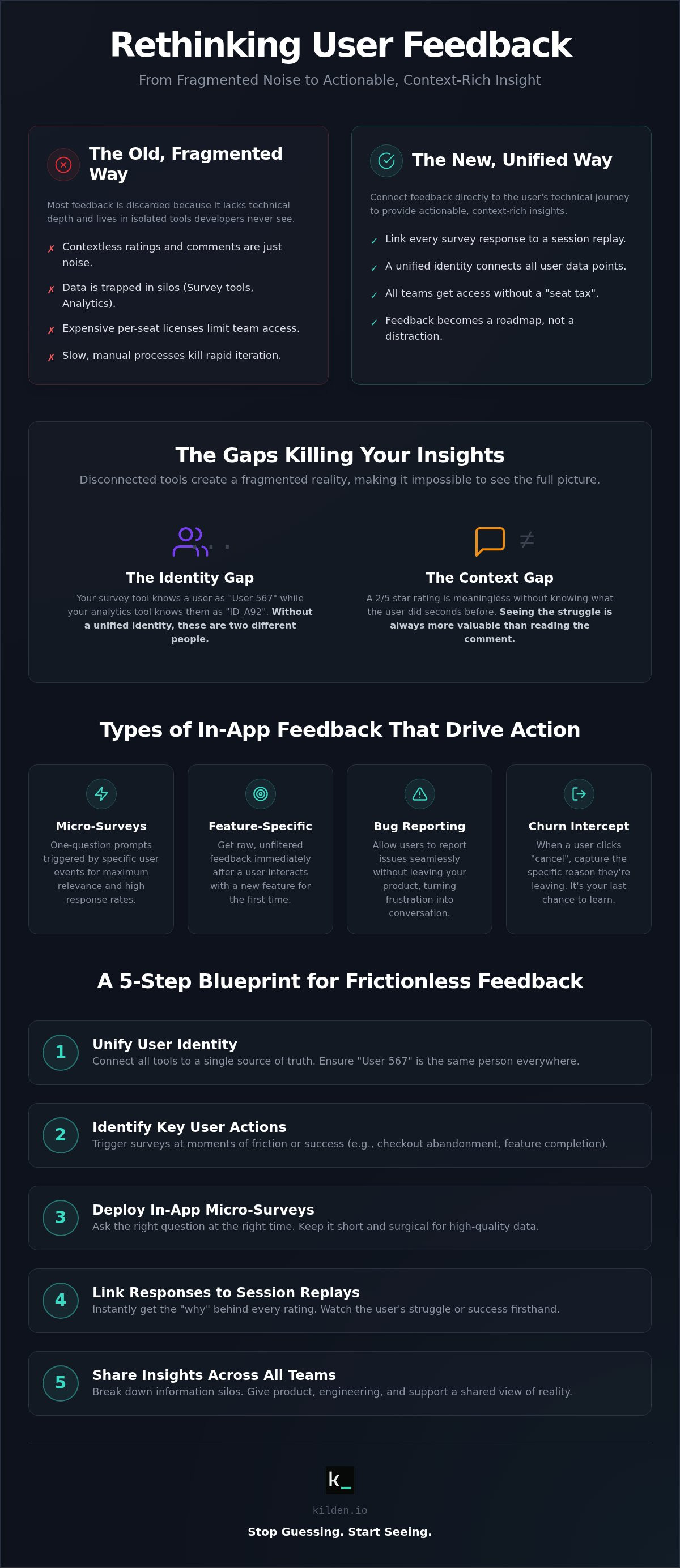
Most companies treat feedback like a checkbox. They buy a survey tool, launch a pop-up, and watch the ratings roll in. Then they wonder why nothing changes. Engineering teams ignore the majority of user feedback because it lacks technical depth. A user says "this is broken," but the developer has no idea what "this" is. Without logs, traces, or user paths, that feedback is just noise. It is a distraction rather than a roadmap. When data is disconnected, it is discarded.
The core of the issue is the Identity Gap. Your survey tool knows a user as "User 567." Your analytics tool knows them as "ID_A92." They don't talk to each other. When you collect user feedback in app using disconnected tools, you create a fragmented reality. You see the sentiment in one window and the behavior in another. You waste hours trying to reconcile the two. This tool sprawl doesn't just cost money in licenses; it costs speed. It creates a barrier where only "licensed" users can see the truth, leaving the rest of the team in the dark.
Data Silos: The Silent Growth Killer
Feedback trapped in a standalone tool is a dead end. If your product team has to manually export CSVs to map survey IDs to your internal database, you've already lost. This friction kills rapid iteration. In a product-led growth (PLG) model, speed is your only real advantage. Delayed feedback means you're fixing last month's problems while your competitors are building next month's features. Silos make your team reactive rather than proactive. They turn a dynamic product journey into a series of disconnected data points that nobody trusts. You cannot scale a product when your insights are locked in a cage.
The 'Context Gap' in Qualitative Data
A 4/5 star rating is a vanity metric without context. If a user gives a low score, you need to know what happened five seconds before they clicked that button. Did the page lag? Did a validation error block them? The Context Gap is the distance between a user's word and their action. Feedback like "I can't find the button" is infuriating when you can't see their screen. Without an integrated session replay, you're just guessing. You need to collect user feedback in app that is tethered to the actual user session. Truth lives in the action, not just the comment. Seeing the struggle is always more valuable than reading about it. Stop asking users to describe their pain; start watching it happen.
Types of In-App Feedback That Actually Drive Action
Generic surveys are a nuisance. If you want high-quality data, you must be surgical. You need to collect user feedback in app at the exact moment a user experiences value or friction. Asking for a rating three days later via email is useless. The memory is gone. The context is lost. To build a better product, you need the truth while it is still fresh.
Micro-surveys are your best tool for high conversion. These are one-question prompts triggered by specific events. If a user completes a complex workflow, ask them how easy it was. If they abandon a checkout, ask what stopped them. Keep it under 10 seconds. Short, punchy questions get real answers. Lengthy forms get ignored.
Feature-specific feedback is critical for product launches. Don't wait for a quarterly review. Deploy a survey immediately after a user interacts with a new feature for the first time. This gives you a raw, unfiltered look at your UX decisions. If you want to see the "why" behind the response, you can use integrated session replays to watch the user's exact struggle. It turns a simple rating into a technical roadmap.
Bug reporting shouldn't be a chore. Using a Messenger tool allows users to report issues without leaving the product. It turns a frustrating technical failure into a direct conversation. Similarly, churn intercept surveys provide a final look at the truth. When a user heads for the "cancel" button, a well-timed survey can capture the specific reason they are leaving. It is your last chance to learn before the user disappears forever.
Passive vs. Active Feedback Collection
Passive feedback relies on persistent buttons. It is always there, waiting for the user to feel inspired. It is low-friction but low-volume. Active feedback uses triggered pop-ups or in-app banners. It demands attention. The key is balance. Use passive buttons for general suggestions. Use active triggers for specific investigations. Banners work well for non-intrusive announcements or broad sentiment checks. Don't interrupt a critical workflow just to ask for a star rating. Respect the user's time and they will respect your questions.
Strategic Survey Frameworks (NPS, CSAT, CES)
Frameworks provide structure to your qualitative data. NPS measures long-term loyalty through targeted campaigns. It tells you how users feel about your brand over time. CSAT is better for milestones. Trigger it after a support ticket is closed or a major task is finished. CES (Customer Effort Score) is the most honest metric. It identifies where your product is too hard to use. High effort leads to churn. Low effort leads to growth. Use these tools to collect user feedback in app that actually results in a better user experience.
Infrastructure: Why Your Feedback Needs a Unified Identity
Data silos are an infrastructure failure. When you collect user feedback in app using a standalone tool, you are creating technical debt that your product team pays every day. You end up with a "Frankenstein" stack. Your messenger, your surveys, and your analytics all have different definitions of who your user is. A unified identity is the only way to achieve a single source of truth. It ensures that every insight is actionable from the second it arrives. Without a common ID, your data is just a collection of disconnected guesses.
Manual data engineering is the hidden cost of fragmented tools. If your engineers are writing scripts to pipe survey results into a data warehouse, you're doing it wrong. This is a waste of technical talent. A unified infrastructure eliminates this step. The data is already where it needs to be. It is ready for analysis, not just storage. You move from "collecting data" to "using insights" instantly. This is the difference between a tool that works for you and a tool you have to work for.
The Feedback-Replay Loop
There is a specific moment of relief when you click a survey response and an integrated session replay starts playing. You don't have to email the user to ask what happened. You don't have to guess if they were on a mobile device or a desktop. You just watch. This combination replaces hours of tedious user interviewing with minutes of direct observation. The Feedback-Replay Loop is the ultimate shortcut to UX clarity. It turns a qualitative comment into a technical diagnostic tool. You see the friction, you understand the "why," and you fix the problem.
Segmenting Feedback with Feature Flags
Survey fatigue is a growth killer. If you blast every user with every survey, they will stop responding. Feature flags are the solution. They allow you to collect user feedback in app by targeting surveys only to users in a specific beta group. You can exclude users who just interacted with an in-app banner or a messenger prompt. Managing both flags and surveys on a unified platform gives you technical control over the user experience. You ensure the right person gets the right question at the right time. This isn't just about better data; it is about respecting the human on the other side of the screen. Precision beats volume every time.
A 5-Step Blueprint for Frictionless Feedback Collection
Building a feedback loop is a technical challenge, not a marketing one. You need a repeatable system that captures truth without annoying your users. If you want to collect user feedback in app effectively, you must move beyond the "send and pray" method. This blueprint ensures you collect user feedback in app that actually results in a better product by turning qualitative noise into engineering signals.
Step 1: Define the goal. Stop asking broad questions. Focus on a single friction point, like a drop-off in a specific workflow or a feature with low adoption. Step 2: Identify the trigger. Use event-based triggers to ask the question while the experience is fresh. Step 3: Design for brevity. Three questions is the absolute maximum. Anything more is a survey, not a check-in. Step 4: Automate the loop. Route responses directly to Slack or your dev team. If feedback sits in a silo, it dies. Step 5: Analyze in context. Always review the session replay before deciding on a product fix. The user's words describe the symptom; the replay shows the disease.
Setting the Right Triggers
Event-based triggers are the gold standard. Actions like 'Clicked Export' or 'Sign-up Completed' signal the perfect moment to ask for input. Time-based triggers are often intrusive and irrelevant. They interrupt the user's flow rather than complementing it. You can also use In-app Messaging to set expectations. A quick note explaining that you are looking for specific input on a new tool increases willingness. It makes the user feel like a partner in the process rather than a data point. When the trigger matches the intent, your data quality skyrockets.
Designing for High Response Rates
The 'First Question' rule is simple: make the first click effortless. Use a rating scale or a single-choice button. Once they've clicked once, they are much more likely to finish the survey. In-app Banners offer a non-intrusive way to request feedback without blocking the UI. They are perfect for general sentiment checks that don't require immediate action. When designing the content, favor multiple-choice questions for high-volume data. Save open-text boxes for the final step to capture the nuance. To start building these frictionless loops today, try Kilden's unified survey tools and see the difference context makes.
Scaling Feedback with Kilden: No Silos, No Seat Tax
Tool sprawl is a choice. You do not have to live with the fragmented systems that create the data silos we have identified. We built Kilden to solve a specific technical frustration: the Identity Gap. Most companies use one tool for analytics, another for messaging, and a third to collect user feedback in app. This creates a broken view of the user. In Kilden, every survey response, every messenger conversation, and every session replay is tied to a single, unified identity. You get the whole truth in one place. It is a streamlined reality that replaces the chaos of traditional workflows.
The integration is seamless. You see a survey response and click once to watch the session replay. There is no manual mapping. There are no CSV exports. You move from observation to action in seconds. This is how you build a product culture that values reality over assumptions. When everyone on the team has access to the same context, you stop arguing about opinions and start solving problems. It is about technical agility and forward motion. You stop guessing and start knowing.
Full Transparency, Zero Per-Seat Licensing
Most software companies charge you a Collaboration Tax. They use per-seat pricing to gate your own data. This is a barrier to efficiency. If your developers and designers cannot see the feedback because they do not have a license, the feedback is useless. Traditional platforms punish growth. As your team expands, your bill increases for no reason other than giving people access to the data they need to do their jobs. This creates a perverse incentive to limit access. When you limit access, you create silos. We believe product insights belong to the whole team. That is why we explicitly avoid per-seat licensing. We want your engineers to see the struggle. We want your designers to see the success. To understand why this model is the future, read more about why you should Stop Paying Per-Seat for Product Analytics.
The Kilden Engagement Suite
Kilden is not just a survey tool. It is a unified engagement suite. Our Messenger, In-app Surveys, and Product Tours work together to guide and understand your users. You can collect user feedback in app and launch your first survey in under five minutes without writing a single line of code. The suite is designed for utility. Use Product Tours to onboard users and then follow up with an In-app Survey to measure the experience. If a user encounters a bug, they can reach out via the Messenger. Because everything shares a unified identity, your team sees the full history of that user journey. You are not looking at a snapshot; you are looking at a timeline. This is the antidote to tool sprawl. It is time to simplify your stack and amplify your insights. Start collecting actionable feedback with Kilden today.
Unify Your Insights and Build with Confidence
Fragmented data is a choice that limits your product's potential. You have seen how to collect user feedback in app by using triggers that respect the user's journey. You know that a survey response without a session replay is just a half-truth. By moving toward a unified identity, you eliminate the friction that keeps engineering teams in the dark. It is time to stop paying a collaboration tax that prevents your team from seeing the reality of your product.
You deserve a system where analytics and engagement live together. Kilden provides the infrastructure to link every response to a technical session without the burden of per-seat licensing. Invite your whole team. Watch the replays. Fix the friction. Build a better product with Kilden's unified feedback tools and turn qualitative noise into a clear roadmap for growth. Your users are already telling you what they need; you just need the right tools to listen. Build something they actually want.
Frequently Asked Questions
How do I collect user feedback in-app without being annoying?
Use targeted triggers instead of random pop-ups. Respect the user's workflow by using non-intrusive elements like in-app banners for general checks and micro-surveys for specific event-based feedback. Don't interrupt a conversion path. If you target the right segment at the right time, the survey feels like a helpful check-in rather than an interruption. Precision beats volume every time.
What is the best time to trigger an in-app survey?
Trigger surveys immediately after a user completes a meaningful action. This could be finishing a product tour, exporting a report, or using a new feature for the first time. The goal is to capture sentiment while the experience is fresh. Avoid triggering pop-ups during initial login or high-focus tasks where the user is trying to get work done. Context is everything.
Should I use NPS or CSAT for my SaaS product?
Use both for different purposes. NPS measures long-term brand loyalty and is best for quarterly campaigns. CSAT measures satisfaction with specific interactions, like a support chat or a milestone. For SaaS, CES (Customer Effort Score) is often more useful than both. It identifies where your product is technically difficult to navigate. Focus on where the friction lives.
How do I link user feedback to my product analytics?
Use a unified identity system to collect user feedback in app. Instead of using a separate survey tool, use a platform that ties survey responses to your existing user IDs and session replays. This eliminates the need for manual data mapping. When a user submits feedback, you should be able to see their event history and technical logs in the same dashboard. Truth requires unity.
What are the common mistakes when collecting in-app feedback?
The biggest mistake is collecting contextless data. A rating without a session replay or user journey history is just a vanity metric. Other mistakes include asking too many questions, failing to close the loop with the user, and gating feedback data behind expensive per-seat licenses. If your engineering team can't see the feedback, you're wasting your time. Data silos kill growth.
Can I collect feedback from users who are offline?
Yes, but it requires local storage synchronization. Most modern SDKs will cache the feedback locally on the user's device and upload it once a connection is re-established. However, for SaaS products, real-time feedback is usually preferred. It allows you to trigger session replays and follow-up messaging while the user is still active in the product. Real-time data drives faster fixes.
How many questions should an in-app survey have?
Keep it to one or two questions for maximum completion. The 'First Question' rule is critical; make the initial interaction effortless. If you need deeper qualitative data, follow a single-choice question with one optional open-text box. High-friction surveys with five or more questions will destroy your response rates and frustrate your users. Respect the user's time and they will give you the truth.
How do I ensure my dev team actually acts on the feedback?
Provide them with technical context. Developers don't care about vague comments. They care about session replays, console logs, and error states. When you collect user feedback in app, route the response directly to Slack with a link to the user's session. Showing a developer exactly where a user struggled is more persuasive than any spreadsheet. Make the problem impossible to ignore.