Product Tour Software for Onboarding: The 2026 Buyer's Guide


on this page ▾
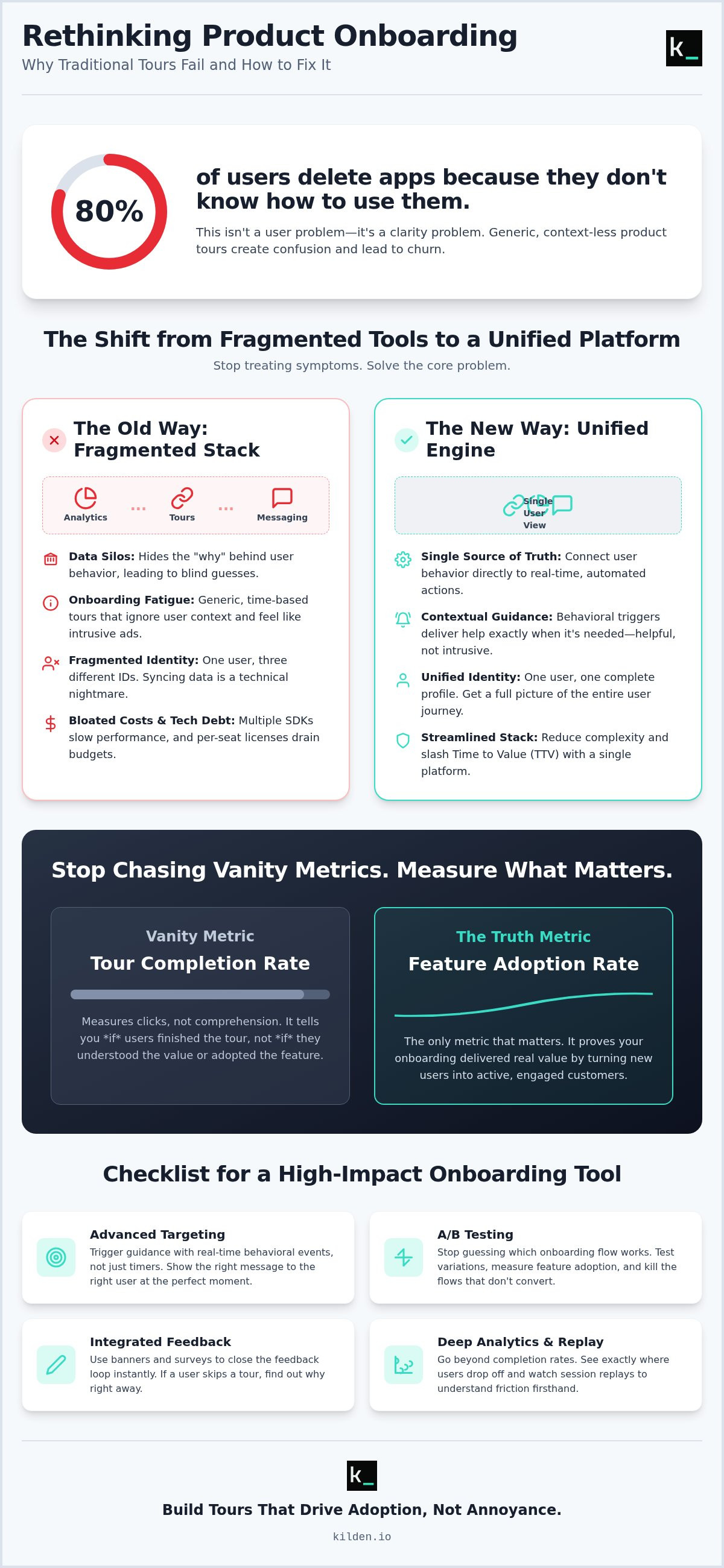
80% of users delete apps because they don't know how to use them. That's a failure of clarity. Most product tour software for onboarding is just noise. It's a series of "Next" buttons that users click just to make them disappear. You're likely seeing high drop-off rates and feeling the weight of bloated per-seat licensing costs. Managing separate tools for analytics and messaging has created a fragmented mess. It's time for a more logical approach.
You know that a tour without behavioral context is just a distraction. We agree. This guide will help you stop the guessing game. You'll learn how to find the onboarding software that actually drives adoption by connecting user behavior to real-time action. We'll break down the 2026 market landscape, compare the true costs of the major players, and show you how a unified view of engagement can finally slash your Time to Value. Let's get to the truth of your user experience.
Key Takeaways
- Stop fighting data silos. Learn why standalone tools hide the "why" behind user behavior and how to fix it.
- Go beyond the tooltip. Discover how to evaluate product tour software for onboarding based on integrated feedback loops and behavioral triggers.
- Audit your licensing. Compare legacy pricing against modern models to eliminate unnecessary per-seat costs.
- Connect the dots. Understand why your analytics and tours must share a single identity to drive real feature adoption.
- Simplify your stack. See how managing tours, banners, and surveys from one dashboard reduces complexity and increases speed.
Table of Contents
- The Problem with Standalone Product Tour Software
- Evaluating Onboarding Software: Beyond the Tooltip
- Top Product Tour Software for 2026: A Comparison
- Why Your Analytics and Tours Must Share One Identity
- Building High-Impact Tours with Kilden
The Problem with Standalone Product Tour Software
Most companies treat onboarding like a UI problem. It isn't. It's a context problem. You buy a standalone tool to fix churn, but you end up with a data silo that hides the "why" behind user behavior. Product tour software is a layer designed to guide users through a digital interface. It's meant to facilitate the User onboarding process. However, when that layer is disconnected from your core data, it's just a series of blind guesses.
Most tours fail because they are triggered by time. They don't care if a user is stuck. They only care that a user has been on the page for ten seconds. Choosing the right product tour software for onboarding requires looking past the UI layer. You need a system that understands friction. Without it, you're just adding noise to an already crowded screen. Fragmented identity is the hidden cost of this approach. Syncing data between disparate tools is a technical nightmare that creates more problems than it solves.
Why Your Users are Clicking "Skip"
Generic tours treat every user like a first-time visitor. They ignore the power user who just switched accounts. They ignore the returning user who already knows the basics. This total lack of behavioral context makes tooltips feel like intrusive ads. Users don't want a lecture; they want to get to work. We define onboarding fatigue as the cognitive drain caused by irrelevant UI overlays that block a user's path to value. When you force a user to click through six modals they don't need, they don't learn. They just leave.
The Technical Debt of Multi-Tool Stacks
Every new SDK you add is a performance tax. It slows down your application. It creates operational waste. You're stuck managing separate billing, logins, and permissions for a dozen different tools. This isn't just an administrative headache; it's a technical liability. The real killer is the "Identity Crisis." Your analytics tool sees one person. Your tour tool sees another. Your messenger sees a third. Syncing this data is a technical nightmare that most teams never solve. You end up with fragmented truth and a broken experience. One user. Three IDs. Zero clarity. That's the true cost of a bloated, fragmented stack.
Evaluating Onboarding Software: Beyond the Tooltip
Don't buy a tooltip engine. That's 2015 thinking. If you only look for "bubbles" on a screen, you're buying a band-aid for a broken product. High-performance teams look for a growth engine. They prioritize product tour software for onboarding that integrates feedback loops directly into the experience. You need to know why a user is confused, not just that they clicked "Next."
The "No-Code" promise is often a lie. Many tools claim simplicity but require a developer just to set up the event triggers. If your Product Manager can't build and deploy a tour in ten minutes, the tool is a bottleneck. It's operational waste. Similarly, ignore on-premise hosting. It's a relic of a slower era. Modern growth requires the agility of the cloud. It requires speed. It requires clarity.
Core Features Your Team Actually Needs
Advanced targeting is non-negotiable. Stop showing "How to Create a Project" to users who have already created ten. Use real-time behavioral events to trigger guidance only when it's needed. This aligns with the Principles of effective onboarding by reducing cognitive load. You should also demand A/B testing. Guessing which flow works is for amateurs. Test two variations. Kill the one that doesn't convert.
Integrated banners and surveys are the final piece. They allow you to close the feedback loop instantly. If a user skips a tour, ask them why. If they reach a milestone, celebrate it. This level of interaction turns a static tour into a conversation. If you want to see how this looks in practice, explore a unified growth suite that combines these elements.
The Importance of Analytics Integration
Tour completion rate is a vanity metric. It doesn't matter if 90% of users finish your tour if 0% of them actually use the feature. You must measure feature adoption rate. That is the only truth that matters. Your software should show you exactly which step causes users to drop off or close the app. This is where session replay becomes a superpower. It lets you watch the friction happen. You don't have to guess why a step is broken; you can see it. Stop looking at spreadsheets. Start looking at behavior. This is how you move from "guiding" to "growing."
Top Product Tour Software for 2026: A Comparison
The market for product tour software for onboarding is split. On one side, you have legacy giants. They offer name recognition and bloated feature sets. On the other, you have modern growth platforms. These are built for speed and technical agility. Your choice depends on one metric: Time to Value (TTV). If your software takes three months to implement, it isn't a solution. It's a bottleneck. 2026 is the year of efficiency. Stop paying for complexity you don't use.
Pricing models are the first red flag. Many legacy tools rely on seat-based licensing or aggressive Monthly Active User (MAU) tiers. This creates a "success tax." As your company grows, your software bill explodes. This is operational waste. Modern alternatives are moving toward flat-rate or usage-based models that align with your actual growth. You need a tool that scales with you, not one that punishes you for winning.
Legacy and Traditional Solutions: Appcues, WalkMe, and UserGuiding
Appcues remains a popular choice for UI control. It's intuitive for non-technical users. However, it gets expensive fast. Its MAU-based pricing makes it difficult for scaling startups to predict costs. It excels at the UI layer but often lacks the deep behavioral context needed for true personalization.
WalkMe is the heavyweight of the industry. It's primarily designed for internal employee training. If you need to teach five thousand employees how to use a legacy CRM, WalkMe is the answer. For a customer-facing SaaS product, it's often too intrusive. It feels like a corporate overlay rather than a seamless part of the user experience.
UserGuiding is often positioned as a budget-friendly entry point. It handles basic tooltips well enough for simple applications. However, scaling teams quickly outgrow its limited analytics and lack of deep behavioral triggers. It's a starter tool, not a long-term growth engine.
Modern Alternatives: Chameleon and Kilden
Chameleon is built for design-obsessed teams. It offers strong integrations and a high degree of customization. It's a solid choice if you already have a massive, fragmented tech stack and just need one more tool to bridge the gap. It prioritizes the aesthetic of the tour, which is vital for high-end consumer products.
Kilden is the logical choice for teams tired of fragmented truth. It's a growth engine, not just a tooltip tool. Kilden solves the "Identity Crisis" by unifying analytics, session replay, and engagement in one place. One user. One ID. Complete clarity. Unlike legacy competitors, Kilden offers no per-seat licensing costs. This removes the barrier to collaboration across your entire team.
The real advantage of Kilden is the integrated session replay. You don't have to guess why users skip your tours. You can watch them do it. This direct observation allows you to fix friction points in hours, not weeks. It turns onboarding from a static experience into a dynamic conversation based on real human behavior.
Why Your Analytics and Tours Must Share One Identity
Data silos are the enemy of adoption. When your analytics tool and your product tour software for onboarding live in separate worlds, your users suffer. You see a drop in your funnel, but you don't know why. You're guessing. Unified data turns these guesses into certainties. It allows your onboarding to feel like a conversation rather than a manual. Personalization requires a single identity. If the system doesn't know what the user just did, it can't tell them what to do next. It's that simple.
Context is everything. Triggering tours based on Feature Flags ensures users only see what they can actually use. It prevents the embarrassment of "guided" tours for features that are locked or disabled. This eliminates the lag between a user action and the onboarding response. It's real-time relevance. This is human-centric data. You start seeing the person behind the session recording, not just a row in a database. You see their intent. You see their struggle. You see the truth.
The Power of Integrated Session Replay
Stop looking at abstract charts to understand why your tours are failing. Watch the tape. Integrated session replay lets you see exactly where a user fumbles during a "guided" tour. Maybe the tooltip covers the button they need to click. Maybe a UI bug is blocking the path. You won't find these answers in a CSV export. Friction-based triggering is the future of onboarding. It means the system only intervenes when it detects a struggle. It's a proactive help desk that lives inside your UI. If you're ready to stop guessing and start seeing, switch to a unified growth platform today.
Eliminating the 'Franken-Stack'
The "Franken-Stack" is a productivity killer. Stop paying for five different tools when one unified platform does it better. Every extra tool adds latency to your application. Every extra integration adds a potential point of failure. Using one interface reduces the mental load on your product team. It provides a single source of truth for all user engagement data. No more syncing issues. No more "Identity Crisis." You get the relief of a streamlined workflow and the power of a complete data picture. It's about wholeness. It's about technical agility. It's about respecting your own time.
Building High-Impact Tours with Kilden
Kilden isn't just another tooltip tool. It's a growth engine. Most product tour software for onboarding is built as a standalone layer that sits on top of your app. That's a mistake. Layers add friction. Kilden integrates directly into your workflow. You can deploy product tours, in-app banners, and in-app surveys from a single, unified dashboard. It's about wholeness. You stop managing five separate logins and start managing your product's actual growth. This is the relief of simplification.
Scale your team without fear. Legacy pricing models often include a "success tax" through per-seat licensing. This creates a barrier to collaboration. It keeps your engineers, designers, and support staff out of the growth process because the cost is too high. Kilden eliminates this hurdle. No per-seat licensing means your entire team can contribute to the onboarding experience. Implementation is built for speed. You get your first tour live in minutes, not weeks. We value your time and your technical intelligence. We don't waste either.
The Kilden Advantage: Unified Insight
Combine session replay with product tours to see the full story. As we established in previous sections, watching a user struggle is the only way to fix a broken flow. Kilden makes this automatic. There is no need to jump between tabs to see why a tour was skipped. Use integrated feature flags to roll out tours to specific segments. You don't need a developer to gate content or target specific user groups. You do it yourself. Track the direct impact of every tour on your core product metrics. Don't settle for vanity metrics like "completion rates." Demand adoption data. Focus on the truth of user behavior.
- Direct Observation: Watch replays of users interacting with your tours to find UI friction.
- Precise Targeting: Use feature flags to ensure only the right users see specific guidance.
- Actionable Data: Measure how tours move the needle on feature adoption, not just clicks.
Ready to Simplify Your Growth Stack?
Stop overpaying for fragmented tools that don't talk to each other. The era of the "Franken-Stack" is over. It's an inefficient way to build software. Empower your product team with the tools they actually need to win. You deserve a single source of truth for all user engagement data. It's time for a logical alternative that prioritizes utility over marketing fluff. Experience the clarity that comes from a unified platform. Experience a better way to onboard with Kilden.
Reclaiming Your Growth Momentum
Onboarding isn't a static layer. It's a dynamic conversation. You've seen the cost of fragmented data and the "Identity Crisis" created by multi-tool stacks. Standalone tools hide the truth of user behavior. To drive real feature adoption, you must connect guidance directly to behavioral context. Complexity is a choice. Efficiency is a strategy.
Choosing the right product tour software for onboarding means prioritizing clarity over clutter. It means moving from blind tooltips to action-triggered guidance that respects the user's intent. You need a system that honors your technical intelligence and your operational budget. Stop settling for bloated ecosystems that tax your success and limit your vision.
Kilden offers a logical path forward. You get Unified Product Analytics, Integrated Session Replay, and no per-seat licensing costs. It's the only way to see the full story of your user journey in a single source of truth. Eliminate the silos. Fix the friction. Empower your entire team to build a product that users actually understand.
Stop paying per seat. Start growing with Kilden.
Your users deserve an experience that makes sense from the first click. You have the tools to build it. Reach for the truth and start growing today.
Frequently Asked Questions
What is the difference between a product tour and a walkthrough?
A product tour is a high-level overview; a walkthrough is a task-oriented guide. Tours introduce the "what," while walkthroughs teach the "how" through specific, step-by-step actions. Most teams use these terms interchangeably, but the distinction matters for user cognitive load. Focus on guiding the user to a specific outcome rather than just showing them a series of buttons they didn't ask to see.
How much does product tour software typically cost in 2026?
Costs vary based on Monthly Active Users (MAUs). Mid-market tools typically start between $250 and $300 per month for basic tiers. High-end enterprise solutions often reach five or six figures annually, sometimes exceeding $75,000 for large-scale deployments. Avoid tools that hide their pricing behind mandatory sales calls if you value transparency. Look for models that don't punish your growth with "success taxes" or per-seat fees.
Can I build product tours without knowing how to code?
Yes, most modern product tour software for onboarding provides a visual, "no-code" editor. Product Managers can usually build and deploy tooltips or modals without bothering an engineer. However, the "no-code" promise often breaks when you need complex behavioral triggers. Ensure your tool allows for deep event-based targeting without requiring a custom script for every new flow you want to test.
Does product tour software slow down my website or app?
Every external script adds weight. A heavy SDK can increase page load times and degrade the user experience. Choose a lightweight solution that loads asynchronously to minimize the performance hit. If your app feels sluggish, audit your growth stack. Fragmented tools often load redundant libraries that slow everything down; a unified platform is almost always more efficient.
How do I measure the ROI of my onboarding software?
Stop looking at completion rates. ROI is measured by feature adoption and Time to Value (TTV). Given the median activation rate for B2B SaaS in 2026 is 38%, your goal is to move that needle. If users who engage with a tour are more likely to reach their "Aha!" moment than those who don't, your software is working. Use analytics to track the direct correlation between onboarding engagement and long-term retention.
What are the best legacy alternatives for smaller teams?
Smaller teams need agility, not enterprise bloat. Chameleon and UserGuiding are solid choices for basic UI overlays if you have a limited budget. If you want a more unified approach without the massive price tag or technical debt of legacy giants, Kilden is the logical alternative. It provides the same depth of insight as traditional platforms but removes the complexity of managing multiple fragmented systems and separate billing cycles.
How can I prevent users from skipping my product tours?
Make them relevant. Users skip tours because they feel like intrusive ads. Use behavioral data to trigger guidance only when a user is clearly stuck or exploring a new feature for the first time. Keep your flows short. A three-step guide that solves a specific problem will always outperform a ten-step generic tour. Context is the best deterrent for the "Skip" button; relevance is the only cure for fatigue.
Do I need separate tools for analytics and in-app messaging?
No. In fact, using separate tools is a technical liability. It creates data silos and leads to an "Identity Crisis" where different tools see the same user as different people. A unified platform ensures your analytics and messaging share a single source of truth. This allows for real-time personalization that separate tools simply cannot match. Simplify your stack to increase your speed and clarity.