Why Data Silos Kill In-App Messaging Engagement in 2026


on this page ▾
Most product teams are effectively flying blind while paying a premium for the privilege. You're likely juggling five different tools, paying per-seat licensing fees that punish your growth, and still accidentally pestering users with banners for actions they completed ten minutes ago. If your in-app messaging platform isn't directly tied to your live behavioral data, you're just creating digital noise. It's an inefficient cycle where developers become bottlenecks for simple updates and data latency kills your conversion rates.
You know the frustration of seeing a "New Feature" announcement pop up for a power user who has been using that tool for months. We're going to show you how to stop guessing what your users need and start executing high-impact, data-driven engagement using a unified strategy. This guide covers how to establish a single source of truth for user data, launch no-code product tours instantly, and drastically lower your software overhead by cutting out the unnecessary bloat of 2026's legacy tech stacks.
Key Takeaways
- Stop confusing push notifications with real-time in-app messaging. Focus on internal activation by delivering context-aware communication exactly when users are inside your product.
- Latency kills engagement. Learn why event-based triggers require low-latency data to avoid messaging users who have already completed the target action.
- Eliminate the "Data Silo Tax." A unified in-app messaging platform removes the engineering hours wasted on syncing disconnected databases and fragmented user identities.
- Remove the developer bottleneck. Adopt a no-code framework that allows product managers to launch tours and banners in minutes rather than waiting for a development sprint.
- Move from insight to action instantly. Use integrated session replays to find user friction and deploy immediate fixes through targeted in-app messaging.
Table of Contents
- What is an In-App Messaging Platform and Why Does Your SaaS Need One?
- How Modern Platforms Drive Action (The Mechanism of Engagement)
- The Fragmented Tool Tax: Why Disconnected Stacks Fail
- A Strategic Framework for Choosing Your Platform
- Kilden: The Unified Alternative to Fragmented Messaging
What is an In-App Messaging Platform and Why Does Your SaaS Need One?
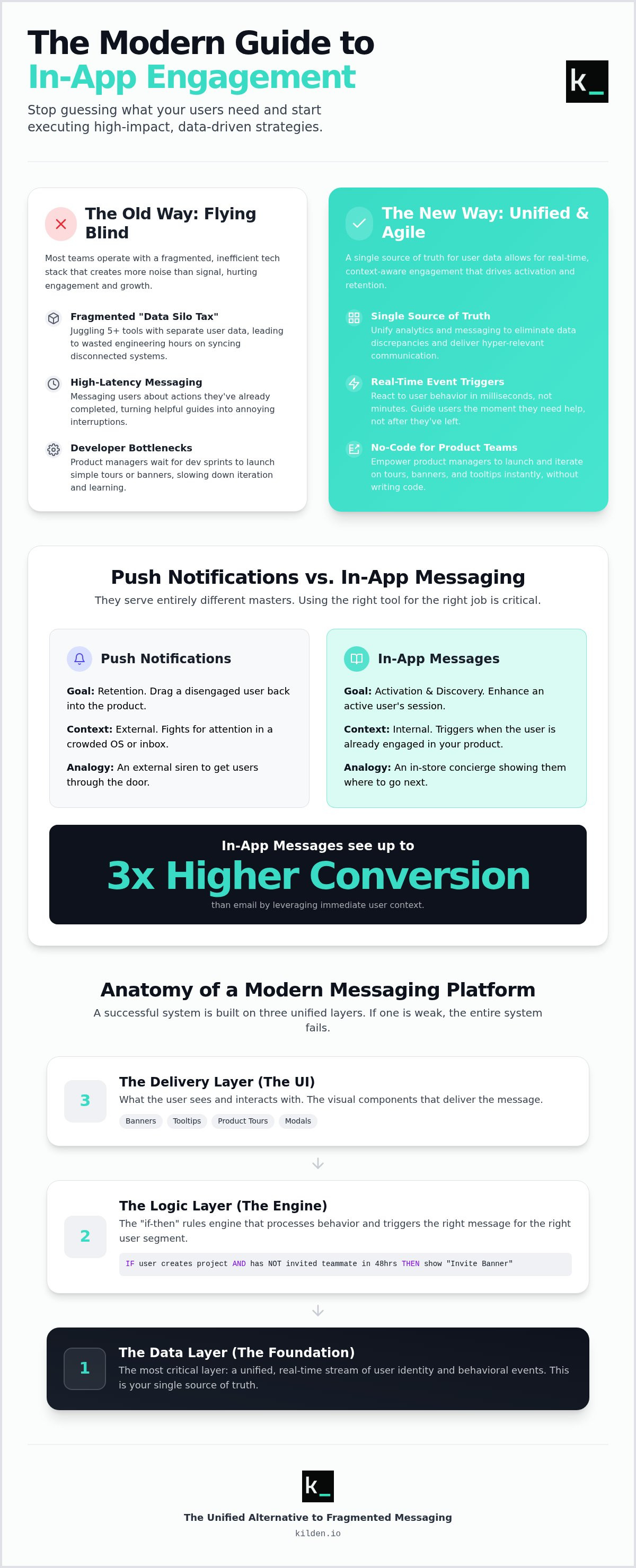
Most SaaS communication is noise. It's generic, poorly timed, and usually ignored. An in-app messaging platform changes the dynamic by moving the conversation from the inbox to the interface. This isn't about marketing blasts. It's about real-time, context-aware communication delivered exactly where your users are working. If a user is struggling with a new feature, they don't want a newsletter three days later. They want a guide right now.
The shift toward Product-Led Growth (PLG) has made this utility mandatory. You can't rely on manual onboarding or heavy-handed sales calls to drive activation. You need to guide users toward their "Aha! moment" through automated, behavioral triggers. Effective in-app messaging acts as a concierge. It identifies friction and offers a solution before the user decides to churn. It's the difference between a product that feels like a tool and one that feels like a partner.
Push vs. In-App: Choosing the Right Channel
Don't confuse push notifications with in-app messages. They serve entirely different masters. Push notifications are external sirens; their only job is to drag a user back into the product. They are for retention. In-app messages are for activation and discovery. They trigger only when the user is already engaged. Because the context is immediate, industry benchmarks show that in-app messages can see 3x higher conversion rates than email. You aren't fighting for attention in a crowded inbox; you're enhancing an active session. Use push to get them through the door. Use in-app to show them where to go.
The Anatomy of a Modern Messaging Platform
A functional in-app messaging platform is built on three distinct layers. If any layer is weak, the whole system fails.
- The Delivery Layer: This is what the user sees. It includes banners for high-level announcements, tooltips for feature education, and multi-step product tours for onboarding.
- The Logic Layer: This is the "if-then" engine. It handles complex event-based triggers. For example: "If a user has created a project but hasn't invited a teammate within 48 hours, show a banner."
- The Data Layer: This is the most critical and often the most broken. It's the underlying user identity. If your messaging tool doesn't know what your analytics tool just saw, you're going to send irrelevant messages.
The goal is total clarity. When your data and delivery layers are unified, you stop guessing and start executing. You eliminate the lag between a user's action and your response. That speed is what defines a modern user experience.
How Modern Platforms Drive Action (The Mechanism of Engagement)
Engagement isn't a happy accident. It's the result of precise, event-based logic. A modern in-app messaging platform operates on a simple premise: if a user does X, but hasn't done Y, you show them Z. This isn't a broadcast. It's a reaction to live behavior. If a user uploads their first file but doesn't set permissions, that's your cue. You don't wait for a weekly digest. You act while the session is active and the intent is high.
Speed is your only competitive advantage here. Data latency is the silent killer of engagement. If your in-app messaging platform takes five minutes to realize a user completed a task, your "helpful" banner becomes an intrusive annoyance. It's outdated before it even renders. You need a system that sees and reacts in milliseconds. This level of precision allows you to segment by actual behavior. You can treat a struggling beginner with high-touch tooltips while leaving your power users alone to work in peace.
Efficiency also means removing the middleman. Product Managers shouldn't have to beg developers for a simple UI update. No-code editors allow you to build, test, and launch engagement campaigns without touching a line of code. It turns weeks of development backlog into ten minutes of work. If you want to see how this works in practice, you can explore a unified approach to engagement that connects your data directly to your UI.
Beyond the Pop-up: UI Patterns That Work
Engagement isn't just about modals that block the screen. It's about subtlety. Contextual tooltips provide "just-in-time" education without breaking the user's flow. In-app banners work for low-friction announcements, like maintenance windows or new feature releases. For onboarding, you need a mix of linear and non-linear product tours. Some users want a hand-held walk-through. Others want to explore and only see a guide when they get stuck. Your platform must support both styles to be effective.
The Feedback Loop: Integrated Surveys
Surveys shouldn't be an afterthought. They are a critical part of the engagement mechanism. By using micro-surveys, you can ask one specific question immediately after a user interacts with a new feature. This provides qualitative data when the experience is fresh in their mind. You can then close the loop instantly. If a user gives a low NPS score, trigger a follow-up banner offering a support call or a specific help article. It's about turning a data point into a proactive solution before the user has a chance to churn.
The Fragmented Tool Tax: Why Disconnected Stacks Fail
Every minute your engineers spend syncing data between customer data platforms, analytics engines, and support tools is a minute they aren't building your product. This is the "Data Silo Tax." It's a hidden drain on your resources that most SaaS companies accept as the cost of doing business. It's not. It's a symptom of a fragmented stack that prioritizes vendor variety over operational efficiency. When your in-app messaging platform lives in a different ecosystem than your behavioral data, you're paying for the privilege of being slow.
This fragmentation creates a permanent identity crisis. Your analytics engine might see a successful transaction, but your messaging tool is still operating on data that's two minutes old. This latency leads to embarrassing user experiences. You've likely seen it: a user pays for a subscription and is immediately met with a high-pressure "Upgrade Now" banner. It's intrusive, it's irrelevant, and it erodes trust. You can't execute high-impact engagement when your tools are arguing over who the user actually is and what they just did.
The financial cost is equally blunt. You are likely paying multiple vendors to store and process the exact same user data. It's redundant. It's a budget killer that scales poorly as your user base grows. True efficiency requires a single source of truth where data and action exist in the same environment. Without it, you're just throwing money at a problem that connectivity could solve for free.
The Engineering Bottleneck
The "no-code" promise is often a lie. In a fragmented stack, launching a simple campaign still requires "some-code" maintenance to ensure custom events are firing correctly across every tool. This creates a constant risk of data drift. Data drift is the discrepancy between siloed user records across different platforms. When these records don't match, your automation fails. Your team ends up chasing bugs in the integration rather than optimizing the user experience.
The Per-Seat Licensing Trap
Seat-based pricing is a relic that punishes collaboration. It forces you to choose which team members "deserve" access to user insights. This silos information between Product, Marketing, and Success teams. You also end up paying for "Hidden Users", inactive profiles in your CRM that still count toward your billing tier. The future of SaaS is moving toward usage-based models that encourage transparency. If your in-app messaging platform limits your team's access based on a seat count, it's actively holding your growth back.
A Strategic Framework for Choosing Your Platform
Choosing an in-app messaging platform shouldn't be a beauty contest. It's a technical decision about data flow. Most teams get distracted by UI templates and flashy animations. They ignore the plumbing. If the plumbing is broken, your messages will be irrelevant. You need a framework that prioritizes data integrity over aesthetic fluff. Focus on these four requirements to avoid buying another silo.
Requirement 1: Unified User Identity. Does the tool share a database with your analytics? If you have to sync data between platforms, you've already lost. A unified identity ensures your messaging tool knows exactly what your analytics tool just recorded. No lag. No drift. Just a single source of truth for every user interaction.
Requirement 2: No-Code Flexibility. Can a non-technical PM launch a banner in 10 minutes? If a campaign requires a developer and a sprint cycle, it isn't a no-code solution. It's a bottleneck. Speed is the only metric that matters for rapid experimentation. You should be able to iterate on the fly without begging for engineering resources.
Requirement 3: Behavioral Triggering. Can you trigger messages based on session replay insights? You should be able to watch a user struggle, identify the friction point, and deploy a fix instantly. This is "See it, Fix it" logic. If your platform can't react to specific behavioral events in real time, it's just a glorified pop-up maker.
Requirement 4: Scalable Pricing. Don't get trapped by per-seat licensing. Your software shouldn't penalize you for hiring more people or encouraging collaboration. Look for platforms that offer flat-rate or usage-based pricing. You can start building a unified engagement strategy here without worrying about seat-based overhead.
Mapping Messages to the User Journey
Engagement isn't a one-size-fits-all strategy. During activation, use product tours to shrink the distance to the "Aha! moment." For retention, target churn-risk segments with banners announcing new value-adds or feature updates. When you see power user signals, trigger expansion prompts. Each message must serve a specific stage of the lifecycle. If it doesn't move the user to the next step, it's just noise.
Metrics That Actually Matter
Forget Click-Through Rate. It's a vanity metric that doesn't track business growth. Focus on Feature Adoption Rate. Measure the impact on Time to Value (TTV). If your in-app guidance doesn't shorten the time it takes for a user to find value, it's failing. You must attribute revenue growth to specific campaigns. High-impact engagement should show a direct line to reduced churn and increased lifetime value.
Kilden: The Unified Alternative to Fragmented Messaging
Kilden isn't another tool for your stack. It's the replacement for your stack. We've built the only in-app messaging platform that natively merges analytics, session replay, and engagement. Most companies force you to bridge the gap between "what happened" and "how to fix it" with complex integrations. We eliminated the gap. By housing your data and your delivery in one place, we effectively kill the "Silo Tax" that keeps your team slow and your users frustrated. You no longer need a data engineer to tell your messaging tool what your analytics tool already knows.
The power of Kilden lies in the "See it, Fix it" workflow. You don't have to guess why users are dropping off at step three of your signup flow. You watch the session replay. You see the friction. You launch an in-app banner or a product tour to resolve it instantly. This is messaging based on actual humanity, not just arbitrary timers or generic segments. It's a direct response to the reality of how people use your software. When you see a user move their mouse erratically near a "Submit" button, you don't wait for a support ticket. You trigger a help messenger session right then.
From Insight to Action in Minutes
Fragmented systems require managed data engineering just to keep user identities straight. Kilden removes that burden entirely. Because our analytics and messaging share the same DNA, there's no data to sync and no latency to manage. Growth teams can cut onboarding friction by 40% simply by reacting to real-time behavioral signals instead of static schedules. This integrated approach ensures that your in-app messaging platform is always operating on the most recent truth. You move from identifying a problem to deploying a solution in minutes, not development cycles. It's about technical agility that actually serves the user.
Scaling Without the Seat Tax
We're blunt about our pricing because the industry standard is broken. Per-seat licensing is a tax on collaboration. It punishes you for being a growing company. It discourages your engineers, designers, and marketers from looking at the same data. Kilden allows unlimited seats across your entire organization. We want your Product, Engineering, and Marketing teams working from the same truth without worrying about the bill. You should focus your budget on driving growth, not on the overhead of adding a new teammate to your dashboard. It's time to stop paying for silos and start paying for results.
Execute your first campaign with Kilden today
Unify Your Stack or Risk Churn
Data fragmentation is no longer just an inconvenience; it's a structural failure. If your analytics and engagement tools don't share the same database, your users will feel the friction. We've shown that true activation requires moving from insight to action in minutes. You can't do that when you're fighting data latency or paying a premium for seat-based licenses that block your team's visibility. The era of the "best-of-breed" silo is over.
Choosing a modern in-app messaging platform means prioritizing unity. You need a system where session replays and behavioral analytics feed directly into your banners and tours. This is how you eliminate the developer bottleneck and build a product that actually responds to user frustration. Kilden provides this wholeness out of the box. With our no-code campaign builder and integrated session replay and analytics, you finally have the tools to execute at high velocity.
It's time to stop punishing your growth with outdated licensing models. We killed per-seat fees to ensure your entire team has access to the truth. Stop paying for silos. Start engaging with Kilden. Your users deserve a product that actually understands them. Go build it.
Frequently Asked Questions
What is the difference between an in-app messaging platform and a DAP?
An in-app messaging platform focuses on real-time engagement and behavioral communication driven by live product data. Digital Adoption Platforms (DAPs) are often heavy, third-party overlays built primarily for employee training or rigid walkthroughs. While a DAP might force a user through a 10-step manual, a messaging platform reacts to what the user is doing right now to drive activation.
Can in-app messaging replace my email marketing for SaaS?
They are partners, not rivals. Email is an external channel designed for re-engagement; its job is to bring users back into the product. In-app messaging takes over once they arrive. It handles internal activation and feature discovery. You shouldn't replace email, but you should expect your in-app messages to have significantly higher conversion rates because the user is already engaged.
How do I avoid annoying users with too many in-app messages?
Stop using timers and start using behavioral triggers. If a message doesn't help a user solve a specific problem or reach a milestone, it's noise. Implement frequency capping and priority levels to ensure users only see the most critical information. If your in-app messaging platform is tied to live data, you'll only show messages when they are actually relevant to the user's current task.
Do in-app messaging platforms slow down my application's performance?
Only if you choose bloated legacy software. Modern platforms use lightweight, asynchronous SDKs that load alongside your app without blocking the main thread. This ensures that your UI remains snappy and responsive. Always verify that your provider uses a global Content Delivery Network (CDN) to minimize latency for your international users.
Is it possible to trigger in-app messages based on custom events?
Yes, and generic triggers are usually a mistake. You should trigger messages based on specific actions like "API key created" or "first teammate invited." This ensures the communication is contextually relevant. A high-quality in-app messaging platform allows you to define these events without writing new code every time you want to launch a campaign.
What are the most effective UI patterns for user onboarding in 2026?
Non-linear tours and contextual tooltips are the current gold standard. Users stay engaged when they feel in control of their learning. Move away from forced, multi-step guides. Use checklists that users can complete at their own pace and tooltips that provide "just-in-time" information when they interact with a new feature for the first time.
How do I measure the ROI of my in-app messaging campaigns?
Ignore click-through rates; they are vanity metrics. Focus on Feature Adoption Rate and the reduction in Time to Value (TTV). Compare a control group of users who didn't see the message against those who did. If the messaged group completes the target action faster and stays active longer, your campaign is delivering a real return on investment.
Can I use in-app messaging for mobile and web apps simultaneously?
Most modern platforms offer cross-platform SDKs to handle both environments. The critical factor is maintaining a unified user identity. You don't want a user to finish an onboarding tour on their desktop only to be met with the same "Welcome" banner when they open your mobile app five minutes later. Unity across devices is essential for a professional experience.