Death of Feedback Forms: Why In-App Messengers Win in 2026

on this page ▾
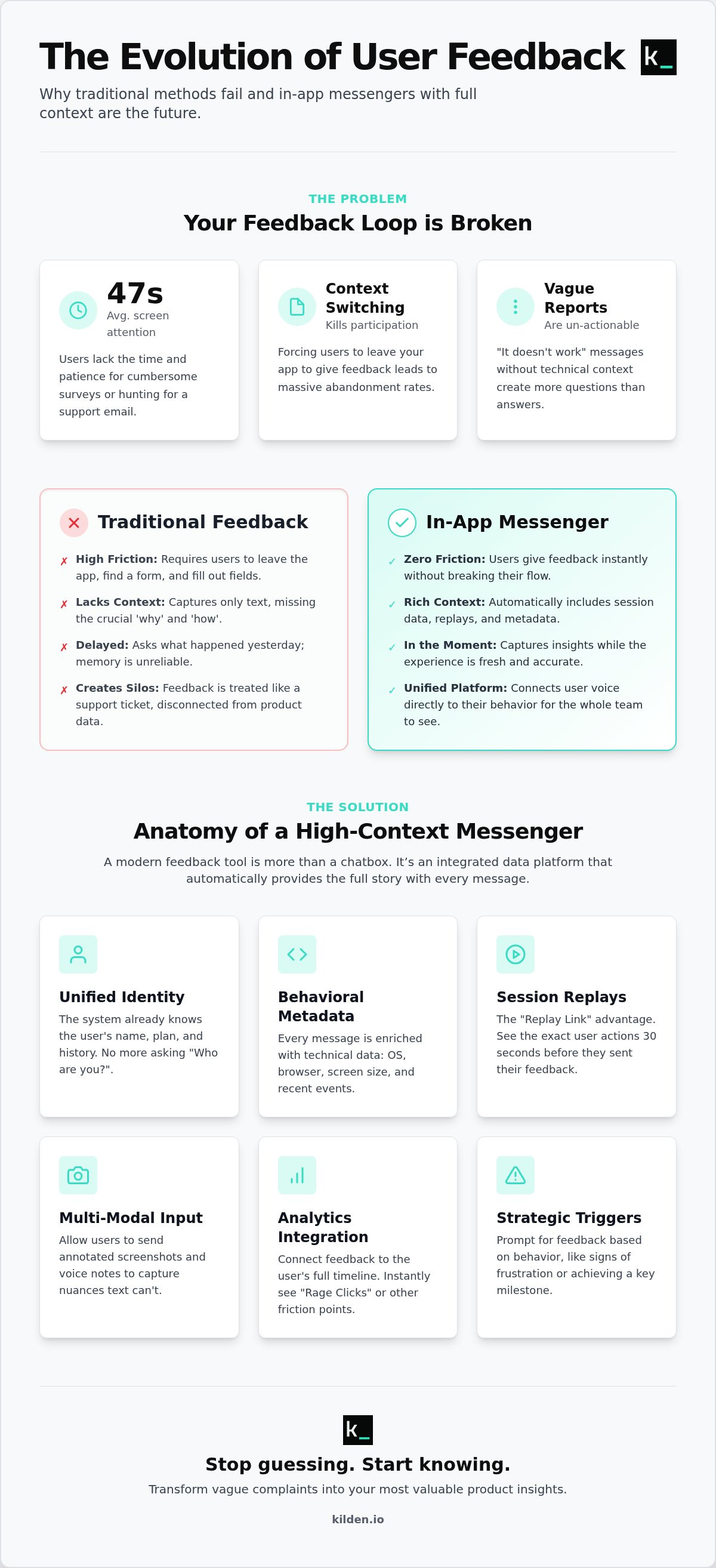
The traditional feedback form is dead. In 2026, average screen attention has dropped to just 47 seconds. Your users won't leave your app to hunt for a support email or fill out a long survey. They shouldn't have to. Implementing an in-app messenger for user feedback is the only way to capture their thoughts without breaking their flow. You're tired of the vague "it doesn't work" messages that lack technical context. You're exhausted by fragmented tools that treat your users like tickets instead of humans. It's time to stop guessing why your response rates are stalled.
You need the whole truth. This means seeing exactly what a user did the moment before they clicked send. We'll show you how to integrate messaging with behavioral data to eliminate guesswork and transform feedback from a chore into a competitive advantage. You'll learn to build a feedback loop that respects the user's time and your team's technical intelligence. We are moving past the era of noise and into the era of actionable, high-context clarity that actually drives your product roadmap forward.
Key Takeaways
- Surveys fail because they lack context. Capture feedback in the moment to get the truth while users are still active.
- Use an in-app messenger for user feedback to end the "it's broken" mystery. Attach session replays and metadata automatically for instant clarity.
- Triggers matter. Deploy prompts based on real-time friction or milestone success to catch users when their input is most valuable.
- Data silos kill efficiency. Use a unified identity platform with no per-seat tax to empower your whole team with direct user insights.
- Context is everything. See the full user timeline to turn vague complaints into actionable product insights that drive your roadmap.
Table of Contents
- Why Your Current Feedback Strategy Is Failing (and Why Messengers Are the Fix)
- The Anatomy of a High-Context Feedback Messenger
- Strategic Triggers: When to Ask for Feedback
- Implementation Guide: From Installation to Actionable Insights
- Kilden: One Messenger, Infinite Context
Why Your Current Feedback Strategy Is Failing (and Why Messengers Are the Fix)
Traditional surveys are failing because they demand too much for too little in return. In 2026, the average smartphone user receives 46 push notifications daily. They don't have the mental bandwidth to leave your app, open an email, and fill out a static form. This is why response rates for external requests have plummeted. You're getting the loudest voices, not the most accurate ones. An in-app messenger for user feedback changes the math. It transforms a post-mortem interrogation into a live conversation. Instead of asking what happened yesterday, you're asking what is happening right now.
Context is the cure for vague data. When a user hits a wall in your UI, they want to vent immediately. By the time they see an email survey, the frustration has faded into a blurry memory. Modern customer feedback management requires moving away from these "post-mortem" reports. An in-app messenger for feedback is a persistent, embedded interface that allows for a real-time user-product dialogue. It is not just a support tool; it is a direct line to the user's current reality.
The Cost of Friction
Every step you put between a user and their ability to speak is a data killer. UX patterns consistently show that forcing a user to switch contexts or apps leads to massive abandonment. If they have to log into a separate portal or find a "Contact Support" link buried in a footer, they simply won't do it. These hurdles make your feedback loop feel like a black hole. Feedback friction is the primary killer of product growth. When reporting an issue feels like work, your users will choose silence over participation. This silence is where your churn numbers grow.
Messengers as a Growth Lever
Messengers move your team from reactive support to proactive product discovery. A chat interface carries a psychological advantage over a form because it feels lightweight and human. It signals that help is instant and that their input is being heard in real-time. This builds a level of trust that a "Submit Ticket" button can never replicate.
- Proactive Engagement: Catch users during high-intent moments.
- Reduced Cognitive Load: Chatting feels natural; filling out fields feels like an audit.
- Instant Validation: Users feel empowered when they know a human (or a highly capable AI) is on the other side.
The Anatomy of a High-Context Feedback Messenger
A standard chat box is a silo. It collects text but ignores the reality of the user experience. To fix this, your in-app messenger for user feedback must be built on a foundation of unified identity. If a user has to tell you who they are or what plan they're on, you've already failed. The system should already know. Identity Stitching is the most critical feature of 2026 messengers because it bridges the gap between a user's voice and their technical reality without manual input.
High-context feedback requires more than just words. It needs behavioral metadata. Every message sent should arrive with a technical breakdown: browser version, OS, and the sequence of recent events. This eliminates the back-and-forth of "Which browser are you using?" and lets your team focus on the solution. This approach aligns with research published in Harvard Business Review regarding the feedback fallacy. It suggests that accurate data is often lost when the process is too abstract or delayed. By capturing technical truth in the moment, you preserve the integrity of the report.
- The 'Replay Link' Advantage: Automatically attach a session recording to every submission. See the 30 seconds of struggle that led to the message.
- Multi-Modal Input: Let users skip the typing. Integrated screenshots and voice notes capture nuances that text often misses.
Connecting Chat to Behavioral Data
A messenger without analytics is just an inbox that creates more work. Kilden solves this by integrating session replays directly into the chat timeline. When a user reports a bug, you don't just read about it; you watch it happen. You can see the exact "Rage Click" that triggered the frustration. This wholeness of data allows your product team to diagnose issues in seconds rather than hours. It turns a vague complaint into a clear directive. You can explore how this works with Kilden's unified identity platform.
The Zero-Engineering Setup
Modern product teams don't have time for complex integrations. A high-context messenger should be deployable via a single SDK. This removes the burden on developers to build custom feedback modals or manual data-slurping scripts. By using a pre-built, intelligent interface, you ensure that your feedback loop is live in minutes, not weeks. The goal is total visibility with minimal friction. This isn't just about convenience; it's about building a system that respects both your users' time and your engineering resources.
Strategic Triggers: When to Ask for Feedback
Timing is the difference between an insight and an annoyance. A passive "feedback" button buried in a settings menu is where data goes to die. Most users ignore these. To get results, your in-app messenger for user feedback must be proactive. It should act on behavior, not just wait for a click. This strategy is a key driver of profitable growth because it captures high-intent sentiment before it evaporates. You're catching the user while the experience is still fresh.
Rage clicking is a clear cry for help. When a user clicks the same element five times in two seconds, they're frustrated. Don't let them leave and vent on social media. Trigger the messenger immediately. Ask what's wrong while the session replay is still recording the struggle. This turns a potential churn event into a moment of support. Similarly, use 'Feature First' prompts. Wait exactly two minutes after a user toggles a new feature on. Ask one specific question about their initial impression. This provides immediate validation for your development team.
- Event-Based Triggers: Prompt the user after they complete a major milestone or face a specific error code.
- Passive vs. Proactive: Use passive buttons for general suggestions, but use proactive triggers for critical UX friction points.
Triggering by User Segment
Not all users are equal. Your power users have the deep-dive insights you need for your long-term roadmap. Target them with specific, high-level questions. Conversely, use The Power of an In-App Messaging Platform to reach at-risk users. If a user hasn't logged in for three days after a period of high activity, an automated, empathetic message can prevent churn. Feature flags allow you to target these feedback prompts to specific cohorts without shipping new code. You control the dialogue based on the user's value and behavior.
The Ethics of In-App Messaging
In 2026, notification fatigue is a genuine threat to retention. Users receive dozens of pings daily. If your messenger feels like an interrogation, they'll simply ignore it. Follow the 'One Question' Rule. Ask for one data point at a time. If the user wants to provide more detail, they will. Respect their workflow. Your goal is to be a partner in their efficiency, not an interruption to their workday. Avoid the trap of over-communication by setting strict frequency caps on your triggers.
Implementation Guide: From Installation to Actionable Insights
Installation is the easy part. The real work begins with defining what success looks like for your feedback loop. You need a 'North Star' metric. For most teams, this is either the response rate or the average time-to-resolution. If you can't measure the impact of your in-app messenger for user feedback, you're just adding noise to the UI. Start by selecting a unified platform that avoids the 'per-seat tax'. When your engineers, designers, and product managers all have access without extra costs, you eliminate the gatekeeping that kills product velocity.
Mapping the user journey is your next priority. Identify high-friction touchpoints where users are likely to drop off. These are your prime candidates for messenger triggers. Instead of a generic "How are we doing?" prompt, use contextual triggers. If a user spends more than 60 seconds on a complex configuration page, open the messenger. Offer help. Use 'shake to report' features to make bug reporting as effortless as a physical gesture. This addresses the friction gap that traditional forms never could.
Auditing Your Feedback Stack
Most companies are drowning in redundant tools. You likely have one tool for surveys, another for support chat, and a third for session replays. This fragmentation creates data silos that hide the truth. You're paying three separate bills for a broken view of your user. It's time to Replace Multiple Product Tools with One Platform. Consolidating your stack reduces the hidden cost of context switching. When your messenger shares an identity with your analytics, you stop chasing ghosts and start fixing real problems.
The 2026 Feedback Workflow
Modern workflows require automation. Your messenger should not be a destination; it should be a conduit. Route feedback directly to Jira, Slack, or Linear based on the tags applied. In 2026, we use AI to cluster messenger feedback into 'Themes' automatically. This allows you to see that 40% of your users are struggling with the same onboarding step without reading every single message. Once a fix is live, close the loop. Reach back out through the messenger to tell the specific users who reported the issue that it's resolved. Closed Loop Feedback is the ultimate retention strategy because it proves to the user that their voice actually moves the needle.
Stop settling for fragmented insights and vague bug reports. You can deploy a high-context messenger for user feedback and start seeing the wholeness of your user data in minutes.
Kilden: One Messenger, Infinite Context
Kilden isn't just another chat box. Most platforms build messengers for support agents to close tickets. We built our in-app messenger for user feedback for product teams who need to build better software. We prioritize wholeness. This means your analytics, session replays, and user messages live in a single, unified timeline. You stop looking at fragmented data points. You start seeing the human experience as a complete story. When a user sends a message, you see the exact state of the app at that millisecond. No guesswork. No assumptions.
The "seat tax" is a relic of legacy SaaS. It forces you to choose which team members get to hear from your users. We don't believe in gatekeeping truth. Kilden offers unlimited seats because every developer, designer, and product manager should see the friction their work creates. You scale your feedback loop without scaling your software bill. It is common sense. It is fair. This transparency democratizes data and ensures that the "voice of the user" isn't filtered through a single department. It puts the truth directly into the hands of the people who can ship the solution.
Messenger + Session Replay: The Ultimate Duo
The most expensive phrase in software development is "I can't reproduce this." It wastes hours of engineering time and leaves users frustrated. Kilden eliminates this by attaching a high-fidelity session recording to every feedback submission. You see exactly what the user saw. You watch the cursor move. You see the technical error state in the console. This skips the exhausting back-and-forth clarification phase entirely. Driving faster resolutions becomes the default, not the exception. Our unified SDK keeps your app lean while providing 10x the insight of disconnected, bloated tools. You get the depth of a full analytics suite with the agility of a lightweight messenger.
Start Collecting Better Feedback Today
Migration shouldn't be a month-long project. We provide a no-engineering migration path from legacy per-seat messengers that are holding your data hostage. You can set up your first feedback campaign in under 10 minutes. Use our no-code triggers to target specific user behaviors or cohorts immediately. Whether it's a new feature launch or a critical bug hunt, you can deploy a targeted in-app messenger for user feedback without waiting for the next sprint cycle. Stop settling for vague reports and siloed inboxes. The truth is already waiting in your users' sessions. Stop guessing and start listening with Kilden’s Messenger.
Own the User Dialogue
The era of guessing why users churn is over. You've seen why static forms fail and how contextual triggers capture the truth. An in-app messenger for user feedback is no longer a luxury; it is the infrastructure of a modern product team. By bridging the gap between what users say and what they actually do, you eliminate the friction that kills growth. You don't need more tickets. You need more clarity.
Kilden provides that clarity through a unified identity across all your engagement tools. We've removed the seat tax so your entire engineering team can watch integrated session replays and understand the technical "why" behind every message. This isn't just about support; it's about building a roadmap grounded in technical reality and human experience. Stop settling for fragmented data and broken workflows that treat your users like numbers.
Stop collecting silent feedback. Start talking to your users with Kilden.
The transition is simple. The insights are infinite. It's time to start listening to what your product is actually telling you. Build with confidence.
Frequently Asked Questions
What is an in-app messenger for user feedback?
An in-app messenger for user feedback is an embedded communication interface that allows users to send messages directly within your product. It functions as a real-time bridge between the user experience and the product development team. Unlike external email surveys, it keeps the dialogue inside the app environment to maintain context and focus.
How does an in-app messenger differ from a standard survey tool?
Standard survey tools are static, one-way, and often external. Messengers are conversational and contextual. Survey tools collect snapshots of data; messengers facilitate ongoing dialogues. An in-app messenger for user feedback captures the "why" while the user is still active in the app, which typically leads to higher response rates than traditional forms.
Will an in-app messenger slow down my website or mobile app?
No, a modern messenger won't compromise your performance if it uses a lightweight SDK. High-quality systems load asynchronously. This ensures they don't block the main execution thread or delay page rendering. Your app's speed remains the priority while you gain deeper user insights.
How do I avoid annoying users with too many feedback prompts?
Use strategic triggers and strict frequency caps. Don't blast every user with the same generic message. Trigger prompts only after specific events, such as a completed milestone or a technical error. Set global rules to ensure a single user isn't interrupted more than once in a defined session or week.
Can I use an in-app messenger for NPS and CSAT collection?
Yes, messengers are ideal for these quantitative metrics. You can trigger a quick rating request followed by an open-ended question for qualitative context. This keeps the interaction short. It increases the likelihood of a response because the friction is significantly lower than a multi-page external survey.
Is it possible to see what a user was doing when they sent a message?
Yes, provided your messenger is integrated with behavioral tools like session replay. You can view the exact sequence of clicks and scrolls leading up to the feedback submission. This wholeness of data removes the need for users to write long, technical explanations of their problems.
Do I need a large support team to manage an in-app feedback messenger?
No. You can use automation and AI to route messages to the correct departments. Feedback should be funneled directly into tools like Jira, Slack, or Linear for engineering and product teams to review. It is about improving the quality of the data, not increasing the volume of manual work.
What are the benefits of a unified analytics and messaging platform?
Wholeness of data is the primary benefit. When your messenger shares a single identity with your analytics, you stop chasing fragmented silos. You see the user's history, their recent behavior, and their direct feedback in one timeline. This leads to faster diagnosis and more accurate product decisions based on truth rather than assumptions.