Reduce Time to Value in SaaS Onboarding: 2026 Checklist

on this page ▾
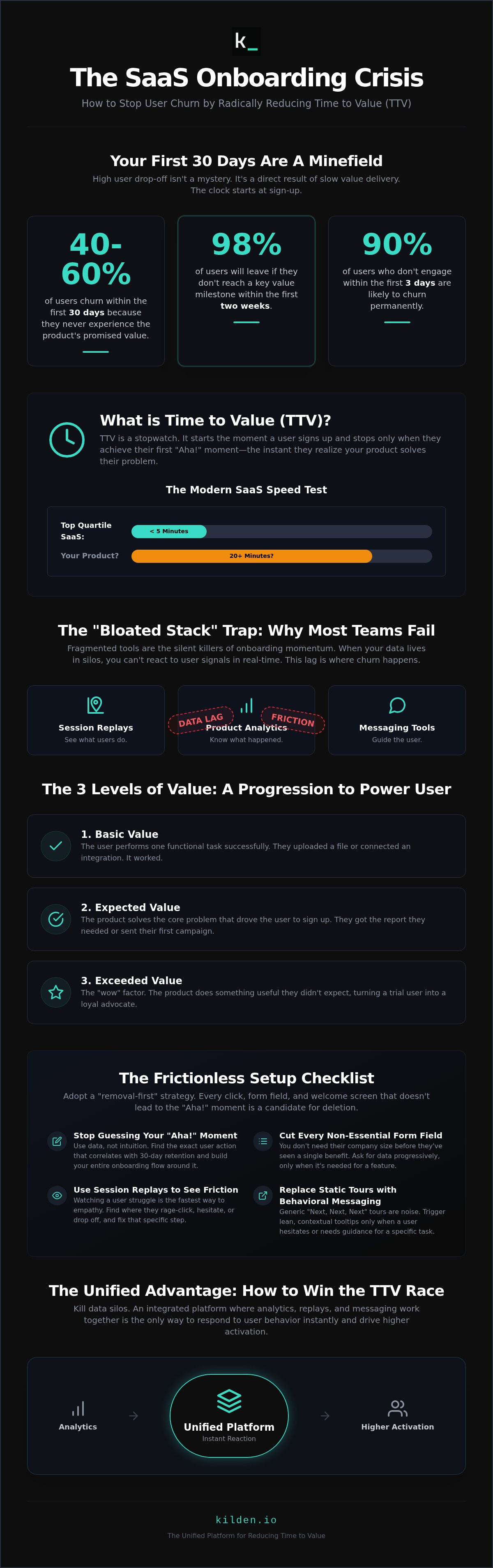
Between 40% and 60% of SaaS users churn within the first 30 days because they never experience the product's promised value. If your new users don't hit a value milestone within two weeks, over 98% of them will leave. It's a brutal reality. You're likely watching high drop-off rates in the first 24 hours while your data sits trapped in silos. To fix this, you must reduce time to value saas onboarding by treating every unnecessary click or bloated form field as a potential exit.
You know the frustration of complex onboarding flows that overwhelm the very people they're meant to help. Most teams guess where the friction is; they don't actually see it. This guide provides a no-fluff, actionable checklist to identify those hidden hurdles and accelerate your user's path to success. We'll show you how to unify your view of user behavior, use session replays to find the "why" behind the churn, and build a streamlined flow that drives activation instead of annoyance.
Key Takeaways
- Stop guessing your "Aha!" moment. Use hard data to find the exact milestone that predicts long-term retention and focus every effort there.
- Discover how to reduce time to value saas onboarding by adopting a "removal-first" strategy that cuts every non-essential form field and welcome screen.
- Use session replays to see the truth of user friction. Watching a user struggle is the fastest way to identify the specific steps that need to be deleted.
- Replace static, noisy product tours with lean, behavioral messaging that only appears when a user actually needs guidance or stalls.
- Kill data silos. A unified view of analytics and messaging is the only way to react to user signals in real time and drive higher activation.
Table of Contents
- What is Time to Value (TTV) and Why Most SaaS Teams Fail
- The 'Aha!' Moment Audit: Identifying Your Value Milestones
- The Frictionless Setup Checklist: A Guide to Radical Simplification
- Bridging the Gap: Using Product Tours and Behavioral Messaging
- The Unified Advantage: Why Integrated Data Wins the TTV Race
What is Time to Value (TTV) and Why Most SaaS Teams Fail
TTV is a stopwatch. It starts the second a user clicks "Sign Up" and stops only when they hit their first "Aha!" moment. In 2026, this clock is ticking faster than ever. Top-quartile self-serve SaaS products now achieve value in under five minutes. If your process takes twenty, you're already losing. Time to Value (TTV) isn't just a metric for your slide deck; it's the primary predictor of whether a user will be with you next month or become part of the 40% to 60% who churn in the first 30 days.
Most teams fail because they view onboarding as a series of boxes to check. They focus on completion rates instead of value delivery. This is the "Bloated Stack" trap. When your product analytics, session replays, and messaging tools live in separate silos, you can't react in real time. Fragmented tools are the silent killers of momentum. If your messaging tool has to wait for a daily data sync to know a user stalled, you've already lost them. To reduce time to value saas onboarding, you have to eliminate the lag between a user signal and your product's response.
The 3 Levels of Value
Value isn't a single event. It's a progression that requires different levels of engagement:
- Basic Value: The user performs one functional task. They uploaded a file or connected an integration. It worked.
- Expected Value: The product solves the core problem that drove the search. They got the report they needed or sent their first campaign.
- Exceeded Value: This is the "wow" factor. The product did something they didn't know they needed, turning a trial user into a power user.
Why Your Current Onboarding is Likely Too Slow
Your onboarding is likely bloated. You're asking for too much data before the user sees a single benefit. This friction is a choice you are making, and it's costing you customers. Research shows that users who don't engage within the first three days are approximately 90% likely to churn.
- Observation: You're forcing 10-field surveys during sign-up. This creates immediate friction before value.
- Observation: Your product tours are generic sequences of "Next" buttons. This is noise, not guidance.
- Action: Stop measuring "tour completion." Start measuring the exact time gap between "Account Created" and "Core Action Completed." If you want to reduce time to value saas onboarding, you must cut everything that doesn't lead directly to that core action.
The 'Aha!' Moment Audit: Identifying Your Value Milestones
Your "Aha!" moment isn't a feeling. It's a cold, hard data point. Most founders guess what it is. They're usually wrong. They think the value is in completing a profile or inviting a teammate. It isn't. The real milestone is the exact moment the user realizes your product solves their specific problem. To reduce time to value saas onboarding, you have to stop rewarding procedural setup and start driving toward functional success. Setup is friction; success is value.
Identifying this moment is the single most effective way to protect customer retention and profitability. When you know which action leads to long-term use, you can strip away everything else. You need to define your "Critical Path." This is the sequence of 3 to 5 steps every successful user takes. If a step doesn't lead directly to the "Aha!" moment, it's a candidate for deletion. You can use session replay to watch the users who don't churn and see exactly where they found their rhythm.
How to Find Your Aha! Moment with Data
Don't rely on intuition. Use your analytics to find the truth through these three steps:
- Segment by 30-day retention: Separate users who stayed from those who left. Look at their first 24 hours.
- Compare behaviors: What did the retained users do that the churned users didn't? Look for the "Inflection Point." This is the specific action that correlates most strongly with long-term use.
- Analyze the "why": Use session replays to visualize the friction. If users stall right before the inflection point, you've found your primary bottleneck.
Common Aha! Moment Examples
The best "Aha!" moments are simple and measurable. They focus on the core utility of the product:
- Slack: A team reaching 2,000 sent messages. This is when the archive becomes valuable.
- Kilden: Deploying your first feature flag or viewing your first session replay. This is when the data becomes actionable.
- Dropbox: Putting one file in one folder on one device. Simple, immediate, and functional.
Action: Write a single sentence defining your product's "Aha!" moment. If you can't define it, you can't optimize for it. To reduce time to value saas onboarding, every element of your UI must point toward this one event. Cut the noise. Focus on the signal.
The Frictionless Setup Checklist: A Guide to Radical Simplification
Onboarding is an exercise in subtraction. Most product managers make the mistake of adding "helpful" steps. They add tooltips, intro videos, and modal windows. Every addition is a barrier. To reduce time to value saas onboarding, you must act as a minimalist. If a screen doesn't get the user closer to their first "Aha!" moment, kill it. Your goal is to move the user from sign-up to success with the fewest possible clicks.
The "Welcome" screen is often a waste of digital real estate. Stop over-explaining your company mission. Start guiding the user to their first functional action. The same applies to email verification. Forcing a user to leave your app to check an inbox is a momentum killer. Unless you're handling sensitive financial data, delay verification until after they've seen the dashboard. Let them feel the value before you demand their credentials. Empty states are another silent killer. A blank screen is a "dead end" signal. Don't show a zero-data state; show a path to action through templates or sample data.
The 'First 5 Minutes' Checklist
In 2026, the benchmark for top-tier TTV is under five minutes. You cannot reach this with a bloated flow. Use this checklist to strip the weight:
- Delete marketing fields: If a form field isn't strictly required for the product to function, remove it. Ask "How did you hear about us?" after they've reached their first milestone.
- Implement Lazy Registration: Let users interact with the core features before requiring a full account setup. The more they invest in the tool, the more likely they are to finish the sign-up.
- Pre-populate with Sample Data: Users need to see what "success" looks like. Provide a workspace that is already alive with data so they don't have to imagine the benefits.
Technical Friction Points to Kill
Speed is a feature. If your dashboard takes four seconds to load, your TTV is already compromised. Users perceive slow software as difficult software. Technical debt in your onboarding flow is a direct tax on your conversion rate.
- Audit load times: Anything over two seconds is a failure. Optimize your initial payload to get the UI in front of the user instantly.
- Expose collaboration: Hidden "Invite Team" buttons prevent users from reaching the network-effect value. Make collaboration a primary action, not a secondary settings tab.
- Action: Open your session replay tool today. Watch 10 new sign-ups from start to finish. Note every time a user pauses for more than three seconds. Those pauses are where your revenue is leaking. Fix them immediately.
Bridging the Gap: Using Product Tours and Behavioral Messaging
Most product tours are noise. They're a sequence of "Next" buttons that users click as fast as possible to get to the actual software. This isn't guidance; it's an interruption. To reduce time to value saas onboarding, your tours must be behavioral. They should only appear when the data shows a user is stuck. If a user is moving toward their "Aha!" moment on their own, don't stop them. Intervene only when momentum fails.
Use in-app banners to suggest the "Next Best Action." These are less intrusive than full-screen modals. They sit at the top or bottom of the screen, offering a clear path forward without hijacking the user experience. Sometimes, the best intervention isn't a tour at all. If a user has been idle on a complex configuration page for more than 60 seconds, trigger a Messenger chat. A human expert can solve a problem in 30 seconds that an automated tour might never address.
Designing High-Impact Product Tours
Tours should be a surgical strike, not a long-form documentary. Follow these constraints to keep users engaged and moving:
- Limit to 3-5 steps: Anything longer is a tutorial, not a tour. If you can't explain the core action in five steps, your UI is too complex.
- Focus on 'Doing', not 'Showing': Never use a tooltip to say "This is the upload button." Use it to say "Click here to upload your first CSV." Action creates investment.
- Provide an exit: Always allow users to opt-out. Trust them to find their own way, but make it easy for them to return to the guide later if they get lost.
Contextual Messaging Strategies
Messaging works best when it's a reaction to user signals. Don't blast everyone with the same "Welcome" sequence. Use your analytics to personalize the experience. A unified platform allows you to trigger messages based on the exact state of your user's data rather than generic timers.
- Ask for the goal: Send an initial in-app message asking, "What are you trying to achieve today?" Tailor the subsequent path based on their answer.
- Survey the friction: Use in-app surveys to ask "What was the hardest part of getting started?" Do this immediately after they hit a milestone while the friction is fresh in their mind.
- Action: Set up a product tour that triggers ONLY when a user fails to hit your "Aha!" action within 120 seconds of landing on the dashboard. This targets the people who actually need help.
If you want to see exactly where your users are stalling before you build your next tour, start using session replay and behavioral messaging to bridge the gap between sign-up and success.
The Unified Advantage: Why Integrated Data Wins the TTV Race
Data silos are the silent killers of TTV. If your messaging tool has to wait for a daily sync from your analytics tool to know a user stalled, you've already lost the retention battle. To reduce time to value saas onboarding, your stack needs to share a single brain. Fragmentation creates lag. Lag creates churn. When your analytics, session replays, and messaging tools are disconnected, you're forced to guess why users are leaving. You see the drop-off in a chart, but you don't see the struggle behind it.
Session Replay provides the human context that raw numbers can't give you. It moves you from "what happened" to "why it happened." You might see that 30% of users drop off at the integration screen. The replay shows they're clicking a non-functional element or getting confused by technical jargon. Fixing that one point of friction can do more for your activation rate than a dozen new features. Growth is a team sport. When you eliminate per-seat licensing, you allow every engineer, designer, and support agent to see these replays. Everyone becomes responsible for the user's path to success.
The Power of One Identity
Stop syncing data between disparate tools. Use a platform where analytics and engagement share one identity. This unified approach allows for real-time responses that feel like magic to the user. You can trigger an in-app banner the exact second a specific feature flag is enabled or a milestone is reached. This "Observe, Engage, Repeat" loop is the only way to keep TTV low. It replaces the "spray and pray" messaging of the past with surgical, data-driven guidance that respects the user's intelligence and time.
Next Steps: Your 7-Day TTV Sprint
Don't try to boil the ocean. Radical simplification happens in small, decisive steps. Use this 7-day sprint to reduce time to value saas onboarding and see immediate results in your activation metrics:
- Day 1: Identify the 'Aha!' moment. Use your analytics to find the one action that correlates most strongly with 30-day retention.
- Day 3: Remove 2 friction points. Watch your session replays. Find two form fields, screens, or buttons that cause users to pause or rage-click. Delete them.
- Day 7: Launch one behavior-based product tour. Target only the users who haven't hit the "Aha!" moment within their first five minutes. Give them the specific nudge they need to cross the finish line.
Stop guessing and start seeing why users drop off with Kilden. By unifying your analytics and messaging into one source of truth, you can finally build the frictionless onboarding experience your users expect in 2026.
Stop Watching Users Churn and Start Driving Activation
The race to value is won or lost in the first five minutes. By now, you know that your "Aha!" moment isn't a guess; it's a data-backed milestone that predicts your survival. To reduce time to value saas onboarding, you must commit to radical simplification. Strip away the noise. Delete the unnecessary fields. Focus every pixel on the core action that proves your product works.
Success requires a single source of truth. You can't fix friction you can't see, and you can't respond to user signals if your data is trapped in silos. Kilden provides a unified analytics and engagement platform that puts session replays and messaging in one place. With no per-seat licensing, your entire team can visualize the struggle and deploy high-impact product tours or banners instantly. It's time to stop guessing and start building. Build a frictionless onboarding flow with Kilden and turn your sign-ups into power users. You have the checklist. Now, you need the tools. Go build something better.
Frequently Asked Questions
What is a good Time to Value (TTV) benchmark for SaaS?
A top-tier benchmark for self-serve SaaS is under five minutes. If your product requires configuration or team invites, the target is under 24 hours. Enterprise-level tools often see timelines between 90 and 180 days due to complexity. Achieving value within 14 days is critical; it correlates with a retention rate of 80% or higher.
How do I measure TTV if I don't have a dedicated data team?
You don't need a data team if you use a unified platform. Track the timestamp of two specific events: "Account Created" and your defined "Core Action." The delta between these two points is your TTV. Integrated tools eliminate the need for manual data engineering or complex SQL queries.
Can product tours actually decrease TTV or do they just annoy users?
Generic tours are noise, but behavioral tours provide essential guidance. Keep them under five steps and focus on actions rather than explanations. If you want to reduce time to value saas onboarding, trigger tours only when a user stalls or deviates from the critical path you've identified.
What is the difference between TTV and Time to Adoption?
TTV measures the time to the first "Aha!" moment or success milestone. Time to Adoption measures how long it takes for a user to integrate the tool into their recurring daily workflow. TTV is about the first win. Adoption is about long-term habit formation and full feature utilization across a team.
How does session replay help in reducing onboarding friction?
Session replay shows the human reality behind your metrics. It identifies rage clicks and technical bugs that raw analytics often miss. By watching where users pause for more than three seconds, you can pinpoint exactly where to reduce time to value saas onboarding by removing specific, visible friction points.
Does a 'Freemium' model help or hurt Time to Value?
Freemium models generally help TTV by removing the immediate payment hurdle. However, they demand a much tighter onboarding flow. Because the user has zero financial investment, they're approximately 90% likely to churn if they don't experience a value milestone within their first three days of use.
How often should I audit my onboarding flow for friction?
Audit your flow monthly or after every major feature release. User behavior changes as your product evolves, and new features often introduce unintended hurdles. Use session replays to conduct a regular friction sweep. This ensures your onboarding remains a streamlined path to success rather than a bloated obstacle course.