How to Trigger In-App Surveys Based on User Behavior: A Lean Implementation Guide

on this page ▾
Most in-app surveys are just digital noise. They interrupt your users at the worst possible moment. They're driven by arbitrary timers rather than actual intent. You've seen the results. Abysmal response rates. Qualitative data that doesn't link to any specific action. To fix this, you must trigger in-app surveys based on user behavior rather than guesswork. It's the only way to bridge the gap between what users do and what they actually think. You know context is everything. Yet, your current tools likely keep surveys and analytics in separate, frustrating silos.
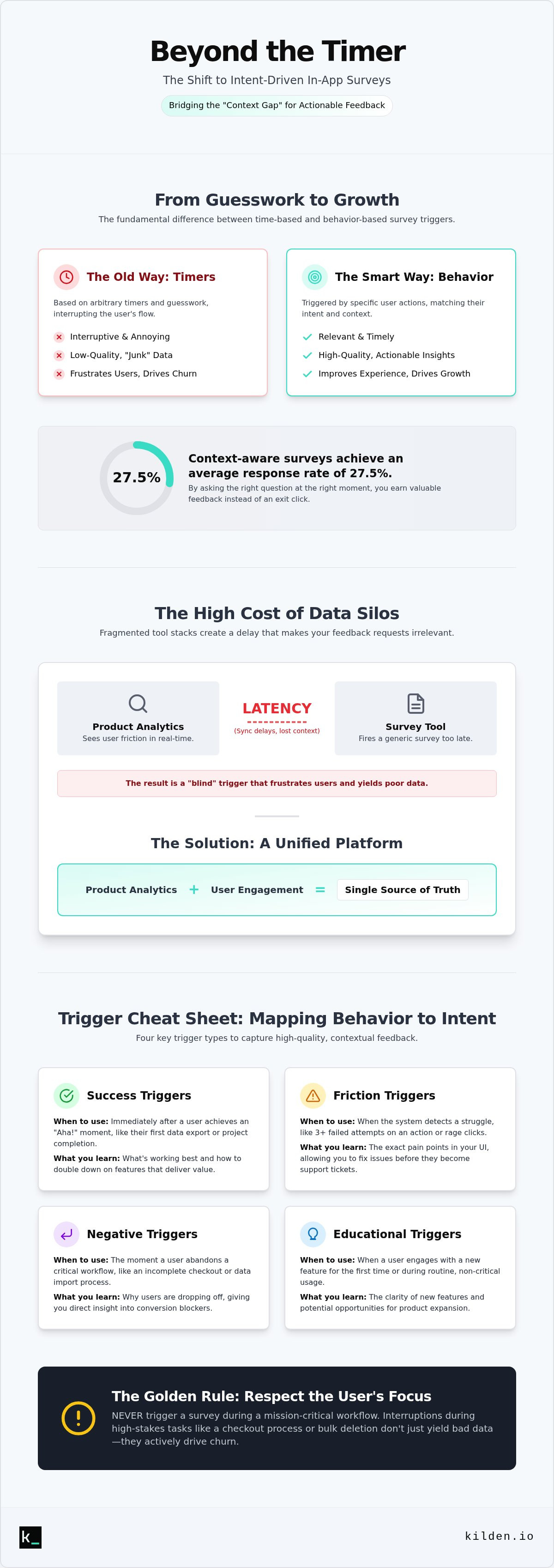
This guide provides a lean implementation path for context-aware feedback. Research shows that in-app surveys can achieve average response rates of 27.5 percent when they're timely and relevant. You'll learn how to map triggers to real user actions. We'll capture high-quality data that actually informs your product roadmap. We'll show you how to unify your data stack, eliminate silos, and finally understand the "why" behind user friction. It's about building a feedback loop that works for your users and your engineering team.
Key Takeaways
- Stop annoying users with arbitrary timers. Learn how to bridge the "Context Gap" by replacing generic popups with intent-driven triggers.
- Discover how to trigger in-app surveys based on user behavior to ensure your feedback requests match the user's current mental state.
- Implement behavioral triggers without engineering bloat by mapping specific events to targeted user segments.
- Pair survey responses with session replays to see the exact friction points that occurred seconds before a user submitted feedback.
- Unify your product analytics and engagement tools to eliminate data silos and build a roadmap grounded in technical truth.
Table of Contents
- The Context Gap: Why Time-Based Triggers Are Failing Your Product
- Mapping Behavior to Intent: Defining Your Survey Triggers
- Step-by-Step: Implementing Behavioral Triggers Without Engineering Bloat
- Beyond the Click: Using Session Replays to Refine Your Survey Logic
- The Kilden Advantage: Unifying Analytics and Engagement
The Context Gap: Why Time-Based Triggers Are Failing Your Product
"30 seconds on page" is a guess. It is lazy engineering. If a user is struggling to find a button, a survey about their "overall experience" at the 30-second mark is an insult. This is the Context Gap. The user's brain is in problem-solving mode, but your survey is in marketing mode. You lose the user, and you get junk data. To capture truth, you must use behavioral analytics to trigger in-app surveys based on user behavior. Interruptive surveys drive churn. Context-aware surveys drive growth. It's that simple.
To better understand this concept, watch this helpful video:
The High Cost of Fragmented Tool Stacks
Fragmented stacks are the enemy of relevance. Your analytics tool sees the click. Your survey tool waits for a sync. By the time the survey fires, the user is three pages away. This latency makes your brand look incompetent. Data silos create "blind" triggers that frustrate users. You can't see that a user just had a payment fail before you ask them how much they love the UI. A unified product analytics and engagement approach is the only way to achieve real-time relevance. You need a single source of truth to act while the user is still present.
Defining "Meaningful Engagement" Over Arbitrary Activity
Stop tracking page views. They mean nothing. A user idling on a tab isn't engaged. Session duration is a vanity metric that leads to bad triggers. Focus on event-based logic instead. Identify "Value Moments," like a successful data export, or "Friction Points," like three consecutive clicks on a non-functional element. This is how you effectively trigger in-app surveys based on user behavior. You align the question with the user's current intent. If they just finished a tutorial, ask about the clarity. If they just hit a paywall, ask about the barrier. That is actionable data. Everything else is just noise.
Mapping Behavior to Intent: Defining Your Survey Triggers
Intent is the only metric that matters. If you trigger in-app surveys based on user behavior, you're asking the right person at the right time. Otherwise, you're just guessing. To maintain clarity and utility, categorize your triggers into three distinct buckets. Educational triggers fire when a user encounters a new feature for the first time. Exploratory triggers appear during routine usage to identify expansion opportunities. Corrective triggers fire only when the system detects a struggle. This logical separation ensures your surveys serve a purpose rather than just taking up screen real estate.
Consider the power of "Negative Triggers." These fire when a user stops an intended action. If a user starts a complex data import but abandons the process halfway through, that is your signal. It is the perfect moment to ask what went wrong. However, you must follow the golden rule: never trigger a survey during a mission-critical workflow. If a user is in the middle of a checkout process or a bulk deletion, leave them alone. Interruptions during high-stakes tasks don't just yield low-quality data; they actively drive churn. Respect the user's focus to earn their feedback.
The Success Trigger: Capturing the "Aha!" Moment
Strike while the iron is hot. When a user completes a high-value task, their sense of accomplishment is at its peak. This is the "Aha!" moment. You should trigger a survey immediately after a user finishes their first successful data export or completes a third-party integration. Positive reinforcement significantly increases response quality. Users are far more likely to provide constructive, detailed feedback when they feel successful. It's the difference between a generic check-in and a targeted inquiry about how your tool helped them win today.
The Friction Trigger: Solving Drop-offs in Real-Time
Friction is your best teacher. Use behavioral analytics to identify exactly where users stumble. If your system detects three failed attempts at a specific action, fire a corrective survey immediately. Ask, "What's stopping you?" instead of waiting for a support ticket that might never come. This proactive approach is how you prevent users dropping off your sign-up funnel before they've even experienced your core value. Real-time intervention saves accounts. By using integrated engagement tools, you turn a point of technical failure into a human conversation. You're no longer just collecting data; you're providing a safety net that informs your product roadmap.
Step-by-Step: Implementing Behavioral Triggers Without Engineering Bloat
Lean implementation isn't about doing less; it's about doing only what works. To effectively trigger in-app surveys based on user behavior, you need a technical foundation that maps events to identity without manual data entry. You define the core event, isolate the right segment, and set strict frequency caps. This is how you move from annoying popups to meaningful dialogue. Start small. Choose one high-impact friction point. Launch. Measure. Iterate. Repeat.
Step 1: Tagging Events in Your Analytics Suite
Everything starts with a clean event. You can't trigger a survey on a "button click" if that button performs five different functions. Select a specific behavioral event like "Feature X Used" or "Payment Failed" that signals clear intent. Ensure the event carries metadata like the error code or the feature version. This allows you to personalize the survey question later. A clean event is a standardized, descriptive label that captures a specific user action alongside the metadata needed to verify its success or failure.
Step 2: Building the User Segment
Targeting everyone is a recipe for low-quality data. It's also a fast way to annoy your best customers. Filter your triggers by user properties such as plan type, tenure, or previous survey history. You don't need to ask a Pro Plan user about basic onboarding features. Combine behavioral history with real-time actions to create hyper-targeted groups. If a user has been active for six months but suddenly stops using a core feature, that is a segment worth surveying. Precision drives response rates.
Step 3: Setting the "Quiet Hours" and Frequency Caps
Survey fatigue is real. It kills the "human" element of your product. Implement global rules to ensure users aren't bombarded by competing messages. Use frequency caps like "One Survey Per Month" to protect the user experience. You should also define "Quiet Hours" for mission-critical workflows. If multiple conditions are met simultaneously, prioritize the trigger with the highest strategic value. For example, a "Payment Failed" corrective survey should always override a general "NPS" request. Logic prevents chaos. By setting these boundaries, you ensure that when you trigger in-app surveys based on user behavior, the user actually feels heard rather than hounded.
Beyond the Click: Using Session Replays to Refine Your Survey Logic
A survey response is only half the story. Qualitative data is subjective; behavioral data is objective. If a user tells you your export feature is "broken," you need to know if the code failed or if the UI was simply confusing. When you trigger in-app surveys based on user behavior, you're acting on a signal. Session replays allow you to audit that signal. By watching the 30 seconds of activity leading up to a survey, you bridge the gap between what users say and what they actually did. This is how you identify "False Triggers." Sometimes a survey appears because of a logic bug or a misfiring event rather than a deliberate user action. Without visual proof, you're just chasing ghosts in your product roadmap.
The "Why" Behind the "What"
Users lie. They don't do it on purpose, but their memory of a friction point is often flawed. You might see a negative response to a corrective survey, but your session replay software shows the user was actually frustrated by a slow-loading third-party integration, not your core product. Identifying "Rage Clicks"—rapid, frustrated clicking on a non-responsive element—is a critical behavioral marker. If you see a cluster of rage clicks, that should have triggered a support survey immediately. Using visual context to debunk misleading feedback ensures your engineering team doesn't waste time on non-existent UX issues. You get the truth, not just an opinion.
Iterating on Your Trigger Logic
Your initial trigger logic is a hypothesis. It needs testing. Use replays to see if your surveys are interrupting the "Flow State" of your power users. If a user is moving quickly through a complex task, a popup is a distraction, even if they've met your behavioral criteria. Adjust your delays based on what you see. You might find that a 5-second delay feels more human and less intrusive than a 2-second delay. Refine the target element to ensure the survey doesn't block critical UI components like the "Submit" or "Cancel" buttons. If you see users frantically closing the survey to get back to their work, your timing is wrong. Refine the logic until the survey feels like a helpful nudge rather than a roadblock. To see the truth behind your user feedback, start using integrated session replays to validate every survey trigger.
The Kilden Advantage: Unifying Analytics and Engagement
Data silos are a tax on your efficiency. Most companies pay this tax willingly by stitching together fragmented tools that refuse to communicate. Kilden eliminates this friction by sharing a single user identity across your entire stack. When you trigger in-app surveys based on user behavior, you need that behavior to be visible to the survey tool instantly. Kilden makes this a reality. You get integrated surveys, banners, and product tours that share the same DNA as your analytics. It is a unified system designed for speed.
Our no per-seat licensing model is a deliberate choice. We believe technical truth should not be gatekept by a budget. Your entire team needs to act on feedback, from the senior engineer to the customer success lead. By removing seat limits, we ensure that the people building the product are the same people seeing the feedback. This allows you to scale product growth without the massive overhead of managed data engineering or complex ETL pipelines. You focus on the human behind the screen. We handle the data plumbing.
A Single Source of Truth for User Feedback
Consolidating analytics, replays, and surveys into one platform is the only lean choice. It's about reducing "Time to Insight." In a fragmented stack, you spend hours exporting CSVs and matching timestamps across tools just to understand a single user complaint. Kilden eliminates this manual labor. You see a survey response and click a single button to watch the replay of that exact session. It is the no-fluff alternative to bloated enterprise suites that require six months of implementation. You get technical depth without the corporate baggage.
Getting Started with Behavioral Surveys
You can launch your first behavioral survey in minutes, not weeks. There is no complex integration logic to write because your events are already being tracked. Because Kilden is a unified product analytics platform, you simply select an existing event and set your segment. The system handles the rest. You can finally stop guessing what your users want and start asking them the moment they show you what they need. Stop letting data silos dictate your roadmap. Start building context-aware campaigns today and see the difference that technical unity makes for your growth.
Build a Roadmap Grounded in Technical Truth
Context is the difference between a helpful nudge and an annoying interruption. You've seen why arbitrary timers fail and why mapping triggers to specific intent is the only way to capture high-quality feedback. By moving beyond page views to event-based logic, you bridge the gap between what users do and what they say. It's time to stop treating surveys like a separate island and start treating them as a core part of your behavioral data stack.
To truly understand your users, you must trigger in-app surveys based on user behavior within a unified environment. Fragmented stacks create latency and blind spots. Kilden solves this by replacing four tools with one platform. You get built-in session replays for total behavioral context and no per-seat licensing ever. This ensures your entire team can act on real-time insights without technical overhead or data silos. Stop guessing and start knowing—try Kilden for unified analytics and engagement. Your users are showing you the way; you just need the right tool to listen.
Frequently Asked Questions
How do I trigger an in-app survey after a specific feature is used?
Triggering after feature use requires tagging the specific event in your analytics suite. You then set this event as the primary condition in your campaign settings. This ensures the survey appears immediately after the action is registered. It is the most direct way to trigger in-app surveys based on user behavior. Always ensure the event carries metadata to help you personalize the question for better clarity.
Can I target surveys specifically to users who haven’t completed onboarding?
You can target specific user segments by filtering for user properties. Create a segment for users where the "onboarding_complete" attribute is false. Combine this property with a real-time behavioral trigger to capture feedback exactly when they stall. This precision prevents you from bothering users who have already found value. It keeps your data clean and your users focused on their actual tasks.
What is a good response rate for behavior-based in-app surveys in 2026?
In 2026, the average response rate for in-app surveys is 27.5 percent. Mobile in-app surveys often perform even better, reaching an average of 36.1 percent. These numbers are significantly higher than traditional email surveys, which typically hover between 5 and 15 percent. High rates are the result of relevance. When you trigger in-app surveys based on user behavior, you're asking questions while the experience is still fresh.
How do I avoid survey fatigue when using multiple behavioral triggers?
Use frequency caps and global "quiet hours" to protect the user experience. Set rules like "one survey per user per month" to ensure you don't become a nuisance. If multiple triggers fire at once, use priority logic to show only the most critical one. A corrective survey for a failed payment should always take precedence over a general NPS request. Logic prevents fatigue and maintains your brand's authority.
Should I use a delay after a behavioral trigger occurs, or show it instantly?
Instant triggers work best for friction points where the user needs immediate help. For success moments, a short delay of 2 to 5 seconds is often better. This prevents you from interrupting the user's "Aha!" moment or blocking their next move. Use session replays to watch how users react to the timing. If they close the survey instantly, your timing is likely too aggressive for that specific workflow.
How do I segment users for surveys based on their previous in-app behavior?
Segmentation relies on combining historical data with real-time events. You can group users based on their tenure, plan type, or previous feature usage. For example, you might only target "Pro Plan" users who haven't used a specific advanced feature in 30 days. This historical context ensures your questions are relevant to their specific journey. Targeted surveys yield actionable insights; generic ones yield noise that frustrates your users.
Is it possible to trigger surveys based on "negative" behaviors like inactivity?
Negative behaviors like inactivity or process abandonment are excellent triggers. You can set a timeout trigger that fires if a user stops moving during a complex workflow. This allows you to ask what stopped them before they close the tab. It turns a potential churn event into a learning opportunity. Identifying why a user stopped is often more valuable than knowing why they continued to the next step.
How can I verify that my survey triggers are appearing at the right time?
Verify your triggers by auditing integrated session replays. Watch the 30 seconds of activity immediately preceding the survey launch. This visual proof confirms whether the survey appeared due to a genuine behavior or a technical bug. If you see users trying to click a button that the survey is blocking, you need to adjust your UI placement. Visual context is the only way to truly debunk misleading feedback.