Feature Flag Best Practices: The 2026 Engineering Guide to Scaling Safely

on this page ▾
Your codebase is a graveyard of forgotten decisions. Every "zombie" flag you left behind is a potential production outage waiting for a single misconfiguration. It's not just messy. It's dangerous. You already know that feature management should feel like a superpower, not a mounting pile of technical debt. You want the speed of continuous delivery without the 2 AM fire drills. You're tired of flags that live in silos, disconnected from the analytics that should be proving their value.
This guide delivers a no-nonsense framework for feature flag best practices to help you scale safely in 2026. We're stripping away the fluff to focus on utility. You'll master the art of unifying product data and eliminating fragmented stacks. We'll show you how to build a clean, maintainable system that provides direct visibility into how your features actually perform. From automated cleanup workflows to integrating session replays for instant debugging, this is your roadmap to faster release cycles with zero guesswork. Let's stop the blind toggling and start building with clarity.
Key Takeaways
- Treat flags as dynamic control points rather than permanent configuration. Enforce a strict two-sprint expiration rule to eliminate "zombie" flags and technical debt.
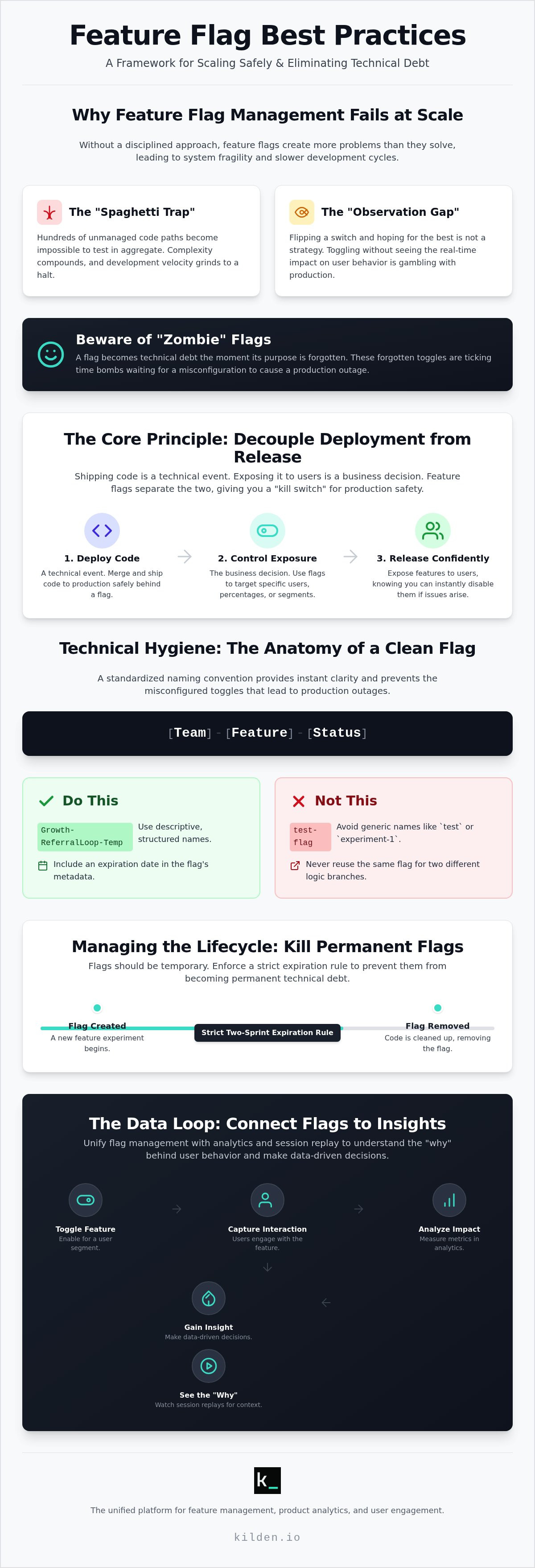
- Implement a standardized [Team]-[Feature]-[Status] naming convention. This provides instant clarity and prevents the misconfigured toggles that lead to production outages.
- Connect your flags directly to product analytics and session replay. You need to see exactly how new features impact user behavior without switching between fragmented tools.
- Master feature flag best practices by unifying your management and observation systems. A single source of truth reduces complexity and speeds up your release cycles.
- Scale your engineering team without the friction of per-seat licensing. Focus on building better products instead of managing tool access or navigating data silos.
Table of Contents
- Beyond the Toggle: Why Feature Flag Management Fails at Scale
- Technical Hygiene: Naming, Scoping, and Runtime Control
- Managing the Lifecycle: Killing the Permanent Feature Flag
- The Data Loop: Connecting Flags to Analytics and Session Replay
- Scaling Without Chaos: The Kilden Approach to Feature Management
Beyond the Toggle: Why Feature Flag Management Fails at Scale
Stop treating a Feature toggle like a static configuration file. It's a mistake that leads to brittle, untestable systems. A flag is a dynamic control point. It's a living part of your runtime environment. In 2026, the industry has shifted toward FeatureOps. This is a discipline that treats feature management with the same rigor as DevOps or infrastructure as code. If you ignore feature flag best practices, you fall into the "Spaghetti Trap." You end up with hundreds of unmanaged code paths that are impossible to test in aggregate. Complexity doesn't just grow; it compounds until your velocity hits a wall.
Scaling safely requires more than just a library to wrap your if/else statements. It demands a commitment to feature flag best practices that prioritize visibility over mere control. If you can't see the impact of a toggle, you aren't managing a feature. You're just gambling with production. The "Observation Gap" is where most teams fail. They flip a switch and wait for the error logs to spike. If the logs stay quiet, they assume success. This is a dangerous assumption that ignores the silent degradation of user experience and product health.
The High Cost of Blind Toggling
Problem: You release a new checkout flow to 5% of your users. Observation: Conversion rates stay flat, but you don't know why. Action: You need the "why" behind the data. Toggling a feature without context is a liability. Code-level flags must talk to your analytics suite. They need the deep context provided by session replay software. When a user struggles with a flagged feature, you need to see their frustration. You shouldn't be hunting for clues in a database. A flag becomes technical debt the moment its purpose is forgotten or its impact becomes invisible.
Decoupling Deployment from Release
Shipping code is a technical event. Exposing that code to users is a business decision. Decoupling these two actions is the primary goal of modern feature management. It offers senior engineers a massive emotional win: the "kill switch." If a new feature causes a memory leak, you don't need a frantic rollback of the entire application. You just flip the toggle. Kilden unifies this technical control with user engagement tools like in-app messaging and surveys. This ensures that the human experience is managed as tightly as the code itself. You control the feature, the data, and the communication from a single point of truth. No silos. No guesswork.
Technical Hygiene: Naming, Scoping, and Runtime Control
Technical hygiene isn't just about aesthetics. It's a requirement for system survival. When your codebase contains 500 flags, a name like "new-checkout-v2" is a death sentence. You need a structure that any engineer can decode at 3 AM. This is the foundation of feature flag best practices. If you can't identify who owns a flag or what it does by looking at its key, your system is already failing. Clean hygiene prevents the "God Flag" phenomenon, where a single toggle controls too much and becomes a single point of failure.
The Anatomy of a Clean Feature Flag
Sloppy naming creates friction. Use a strict [Team]-[Feature]-[Status] format. This creates instant context. It tells you who to call when things break and whether the flag is temporary or permanent. Follow these simple rules:
- Do: Use prefixes like
Growth-ReferralLoop-Temp. - Do: Include an expiration date in the flag's metadata.
- Don't: Use generic names like
test-flagorexperiment-1. - Don't: Reuse the same flag for two different logic branches.
In a 2026 microservices environment, flags must be scoped to the smallest unit of logic that requires independent control. Managing these paths effectively requires a deep understanding of the categories defined in the seminal work on Feature Toggles (aka Feature Flags). Use metadata to keep your flags descriptive. This allows you to store owner info and Jira tickets without bloating the actual evaluation payload. It keeps the system human-readable and machine-efficient.
Server-Side vs. Client-Side Evaluation
Evaluation logic is a trade-off between speed and security. Client-side evaluation is fast. It happens on the device. But it's also exposed. Anyone with a browser console can see your targeting rules. Server-side evaluation is secure. It keeps your logic hidden behind the firewall. The "Kilden Observation" is direct: if a flag controls pricing, permissions, or sensitive security logic, it belongs on the server. Feature flag best practices dictate that you never trust the client with sensitive decision-making logic.
Protecting user data is non-negotiable. Never include PII like emails or physical addresses in your flag evaluation payload. Use hashed identifiers or anonymized UUIDs. It's cleaner, safer, and keeps you compliant with 2026 privacy standards. Stop fighting with fragmented tools and consider a unified feature management approach that handles these security concerns by default. You get the control you need without the risk of leaking your product roadmap or user data to the public web.
Managing the Lifecycle: Killing the Permanent Feature Flag
A permanent feature flag is an oxymoron. If it stays in your code forever, it's configuration. Treat it that way. Most flags should follow the "Short-Lived" rule: they must expire within two sprints. Leaving them active creates a "zombie" environment where nobody knows what code is actually running. This is the antithesis of feature flag best practices. You need a process for killing flags before they kill your velocity. Categorize your toggles immediately. Release toggles are temporary. Circuit breakers are permanent. Don't confuse the two.
Automated alerts are your first line of defense. Set triggers for "stale" flags that haven't seen a state change in 30 days. When an alert fires, the owner must act. If you don't have an owner, you have a problem. Make flag removal a first-class citizen by dedicating time in every cleanup sprint. It isn't "extra" work. It's essential maintenance. To keep your implementation clean, follow these 9 Feature Flags Best Practices to avoid cluttering your logic with unnecessary checks.
The 4 Stages of a Feature Flag Lifecycle
Creation: Define your success metric before writing a single line of code. If you don't know what "good" looks like, you can't measure it. Rollout: Start small. Use canary launches or 1% percentage-based targets to limit blast radius. Observation: Connect your flag state to your product analytics suite. You need to see the correlation between a toggle and user behavior in real-time. Retirement: This is the mandatory deletion phase. Once a feature is 100% rolled out and stable, the flag must die. No exceptions.
Preventing Feature Flag Bloat
Problem: You have 200 flags but only 10 are active. Observation: Testing becomes an exponential nightmare of edge cases. Action: Use "Expiring Flags" to force code hygiene. If a flag reaches its sunset date without being removed, it should trigger a build failure or a high-priority ticket. This forces engineering teams to prioritize cleanup. For large-scale systems, adopt the "One In, One Out" rule. You cannot create a new release flag until an old one is deleted. This maintains a lean codebase and ensures that feature flag best practices are part of the daily workflow, not an afterthought. Stop building silos. Start building a maintainable path to production.
The Data Loop: Connecting Flags to Analytics and Session Replay
Flags are useless if they don't talk to your data. Toggling a feature without tracking its impact is just guessing. You need a closed loop. Every flag event must be a first-class citizen in your analytics suite. This is the core of feature flag best practices. It's not enough to know a flag was "on." You need to know how it changed user behavior. Without this link, you're flying blind. You risk rolling out features that look successful in code but fail in the market. Management without observation is just blind toggling.
Identity must be unified across your entire stack. If User A sees Flag A in your app, they must be the same User A tracked in your analytics. Fragmented stacks break this connection. You end up with data silos where flags don't talk to engagement tools. This fragmentation is a liability. It leads to conflicting reports and wasted engineering time. You shouldn't be manually stitching CSVs together to understand your release. You need a single source of truth that recognizes the human behind the toggle. Truth comes from wholeness, not fragmented data points.
A/B testing is the natural evolution of simple toggling. You move from "is this on?" to "is this better?". This requires sophisticated experimentation that links flag variants to conversion goals. If you can't measure the delta between Variant A and Variant B, you aren't experimenting. You're just deploying. Feature flag best practices demand that every experiment has a clear hypothesis and a data-backed conclusion. This isn't just for product managers. It's for engineers who want to prove the value of their work through cold, hard utility.
Closing the Feedback Loop
Use flag states to drive engagement. If a user is in a "New UI" segment, trigger an in-app survey to get their immediate thoughts. This turns a technical toggle into a qualitative research tool. Seeing a session replay of a failed feature rollout allows you to witness the exact moment a user gets confused. You don't just see the drop-off in a chart. You see the struggle. You see the cursor hover over a button that doesn't work. This level of insight is only possible with unified product analytics and engagement. It transforms debugging from a guessing game into a precise science.
Experimentation Without the Silos
Sophisticated experimentation requires a single data schema. Your feature flag tool and your analytics tool shouldn't be strangers. They should share the same language. Kilden eliminates the "Data Tax" associated with syncing third-party tools. You don't have to pay for the bandwidth or the engineering hours to bridge the gap. You see feature adoption directly against the toggle state in one interface. It's clean. It's efficient. It's the only way to scale safely. Stop managing your features in the dark and unify your stack with Kilden today. You'll gain direct visibility into how your toggled features perform without the overhead of a bloated, multi-tool ecosystem.
Scaling Without Chaos: The Kilden Approach to Feature Management
Fragmented stacks are a tax on your engineering team. You spend more time syncing data than shipping features. Kilden ends this cycle. By consolidating feature flags, product analytics, and session replay into a single platform, we eliminate the friction of modern development. This is the ultimate expression of feature flag best practices. It's about wholeness. It's about seeing the entire user journey without hopping between five different browser tabs. You gain a single identity for every user. You see the truth of how they interact with your software in real-time.
Most enterprise tools use per-seat licensing models. It's a trap. It punishes you for growing your team. It forces you to choose who gets access to the truth and who stays in the dark. Kilden rejects this model. We believe every engineer, product manager, and designer should have access to the data they need to do their jobs. Scaling your feature management shouldn't come with a hidden tax on your headcount. You need a system that grows with you, not one that limits your visibility as you expand.
Why Kilden Beats the Fragmented Stack
Problem: You're drowning in data but starving for insights. Observation: Your current enterprise platform is bloated with features you don't use. Action: Switch to a tool built for utility. Kilden offers a direct, blunt honesty that marketing-heavy platforms lack. Our dashboard is human-centric. It prioritizes the people using the software over the vanity metrics of the corporation. We strip away the fluff to give you the logic of your approach. If you're tired of tools that feel like they were designed by a committee, it's time for a change. You deserve a partner in efficiency, not just another vendor with a complex contract and a fragmented data model.
Getting Started with Kilden
Implementation shouldn't be a project. It should be a task. Kilden requires zero managed data engineering. You don't need a dedicated team to maintain your pipeline or manage your infrastructure. Deploying your first flag takes three steps. Define the flag. Wrap your code. Observe the impact. It's that simple. Because we unify the stack, you can immediately link that flag to a session recording. You see the exact moment a user interacts with your new feature. This removes the friction between engineering and product. You stop arguing about what happened and start discussing why it happened. This is how you master feature flag best practices at scale. You don't just manage code; you manage the human experience. Move fast. Break nothing. Scale safely.
Master the Science of Safe Releases
Scaling safely isn't about adding more tools to a fragmented stack. It's about removing the friction between your code and your users. You've learned that feature flag best practices demand more than just a toggle; they require a commitment to technical hygiene, strict lifecycle management, and unified data loops. Stop letting "zombie" flags clutter your codebase. Stop guessing why a rollout failed when you could be watching a session replay of the exact moment a user encountered a bug. Clarity is the only antidote to technical debt.
Kilden provides the wholeness that traditional platforms lack. We offer unified analytics and feature flags without the overhead of managed data engineering. You get the truth of your product's performance in a single, human-centric dashboard. Because we reject per-seat licensing, your entire team can access these insights without a hidden tax on your growth. It's time to move past the chaos of bloated ecosystems and return to what matters: utility and speed.
Stop toggling in the dark. Build with Kilden. You have the framework. You have the logic. Now, take the action and start shipping with absolute confidence.
Frequently Asked Questions
What is the best naming convention for feature flags?
Use a standardized format like [Team]-[Feature]-[Status] to provide immediate context for ownership and intent. Avoid vague keys like "new-ui" or "test-123" that require tribal knowledge to decode. Explicit naming ensures that any engineer can identify a toggle's purpose during a high-pressure incident response. It's a foundational part of feature flag best practices that reduces cognitive load and prevents the misconfigurations that lead to production outages.
How long should a feature flag stay in the codebase?
Temporary release flags should be removed within 30 days or two development sprints after a successful 100% rollout. Keeping flags longer creates a "zombie" environment where dead code paths accumulate and testing becomes impossible. Permanent flags, such as circuit breakers or kill switches, are the only exception. If a flag isn't serving an active operational or experimental purpose, it's technical debt. Delete the code and move on.
What is the difference between a feature toggle and a feature flag?
There is no functional difference between the two terms; they are used interchangeably across the industry. Both refer to the technique of changing system behavior at runtime without a code redeployment. While some teams use "toggle" for short-term logic and "flag" for long-term configuration, these distinctions are purely internal. Focus your energy on how you manage the lifecycle of these controls rather than debating synonymous terminology.
How do you handle feature flag technical debt?
Implement automated stale flag alerts and treat flag removal as a first-class engineering task during every cleanup sprint. Tech debt happens when flags are forgotten after a feature is stable. Use "Expiring Flags" that trigger build warnings or high-priority tickets if they aren't retired by a set date. By making cleanup a mandatory part of your workflow, you prevent the accumulation of untestable paths and maintain high velocity.
Can feature flags be used for A/B testing?
Yes, feature flags are the primary mechanism for conducting sophisticated server-side A/B tests and experiments. You use them to serve different variants to specific user segments while measuring the delta in performance metrics. This moves your team from simple toggling to making data-backed product decisions. To succeed, your flag system must share a single data schema with your analytics suite to ensure accurate tracking and unified user identities.
Should I use server-side or client-side feature flag evaluation?
Use server-side evaluation for sensitive logic like pricing or security and client-side evaluation for UI changes where low latency is the priority. Server-side is inherently more secure because your targeting rules stay behind the firewall. Client-side evaluation is faster but exposes your flag logic to the browser console. Following feature flag best practices requires a hybrid approach based on the specific risk and performance needs of each feature.
How many feature flags are too many for one team?
A team has too many flags when the complexity of testing all possible path combinations exceeds their capacity to ship safely. There is no magic number, but if your "zombie" flags outnumber your active ones, you have reached a crisis point. High-performing teams often manage between 20 and 50 active flags per service. Beyond this, you risk creating "God Flags" that control too much logic and become single points of failure.