Feature Flags for Beta Testing: A Lean Guide

on this page ▾
Traditional beta testing is a slow-motion car crash. You ship code to a small group, wait weeks for survey results, and pray the production environment doesn't melt. It's an inefficient way to build software. Most teams accept this friction as the cost of doing business. They shouldn't. Logic dictates that if you can't measure a feature's impact in real-time, you aren't testing. You're just guessing.
You're likely tired of the slow feedback loops and the constant risk of a broken launch. It's frustrating when your flagging tools don't talk to your analytics. You're left wondering which feature version caused a crash or why users are dropping off. You need a way to validate ideas without the manual headache of database updates or early access keys. Complexity is the enemy of speed.
This guide shows you how to use feature flags for beta testing to run safer, data-driven experiments. You'll learn to move from "hope it works" to "know it works" using integrated tools that link performance data directly to feature toggles. We'll break down how to achieve zero-downtime rollouts, capture direct feedback in-app, and accelerate your time-to-market. It's time to make your beta process as lean as your code.
Key Takeaways
- Stop treating deployment as a release. Decoupling the two eliminates launch anxiety and keeps your production environment stable.
- Use dark launching to test code in the real world without exposing it to the general public. It's the safest way to validate performance.
- Transition to feature flags for beta testing to move away from slow, manual invite lists and rigid release schedules.
- Integrate flags with analytics to find the truth behind user behavior. Data silos are the primary cause of failed beta programs.
- Capture feedback where it happens. In-app surveys provide immediate, high-quality insights that email surveys simply cannot match.
Table of Contents
- The Friction of Traditional Beta Testing
- How Feature Flags Transform Beta Management
- Beyond the Switch: Measuring Beta Success with Integrated Analytics
- The Human Loop: Communicating with Testers In-App
- Implementing a Lean Beta Strategy with Kilden
The Friction of Traditional Beta Testing
Traditional beta testing is broken. It's slow, manual, and relies on a spreadsheet-driven nightmare of email chains and coordination. You spend more time managing who gets access than you do observing how they use the product. This friction is a choice, not a technical requirement. Most teams treat a beta like a miniature launch. They ship code to a small group and cross their fingers. This approach is inefficient and outdated.
Relying on hard-coded logic instead of feature flags for beta testing creates a bottleneck that slows down your entire roadmap. Hard-coded betas are inherently dangerous because they lack a kill switch. If a feature causes a performance spike or a UI break, you can't just turn it off. You have to roll back the entire build. A Feature toggle approach solves this by separating deployment from release. It gives you the power to toggle features without redeploying code.
Fragmentation is the silent killer of product insight. If your flagging tool is separate from your analytics dashboard, you're flying blind. You know a feature is "on," but you don't see the "why" behind user behavior. Truth requires a unified view of the user journey. Without it, you are just guessing based on incomplete data.
The Cost of "Release and Pray"
Big-bang releases, even to small groups, create a single point of failure. When things go wrong, engineering teams stop building and start firefighting. Emergency rollbacks are expensive and demoralizing. They represent lost time and lost trust. Actionable user sentiment is also delayed. You can't gather honest feedback when the primary experience is a crash or a performance lag. Engineering morale suffers when the release process feels like a gamble rather than a controlled experiment.
Why Focus Groups Fail Modern SaaS
Focus groups are theater. They don't reflect reality. A user sitting in a conference room with a moderator isn't a "real" user. They are performing. This artificiality leads to biased data and poor product decisions. Lab settings lack the messy complexity of real-world data, such as slow internet connections and unexpected workflows. Production-First Testing is the new standard; it's the practice of testing features in the live environment with real-world traffic while maintaining total control over visibility. Implementing feature flags for beta testing allows you to do this safely by targeting specific segments without risking the entire platform.
How Feature Flags Transform Beta Management
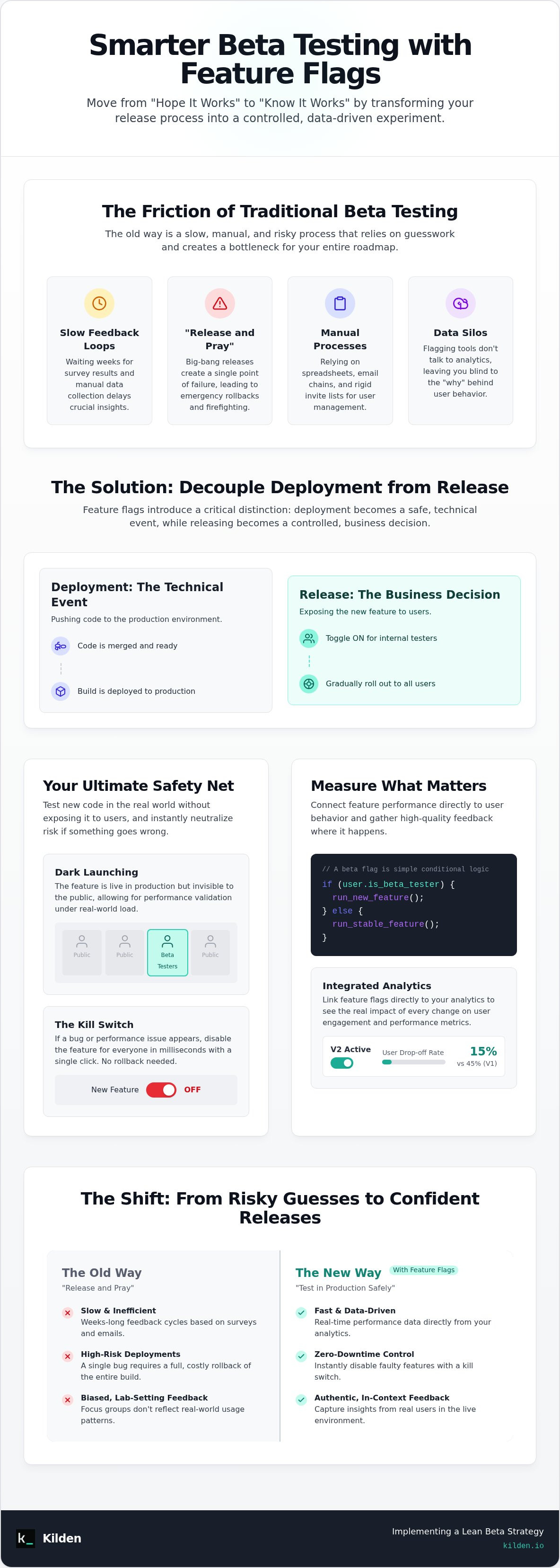
Deployment is a technical event. Release is a business decision. Feature flags make this distinction permanent. When you decouple these two processes, you gain total control over the user experience. You no longer need to wait for a "perfect" build to push code to production. Instead, you push code when it's ready and release it when the business is ready. This is the foundation of a lean development cycle.
Dark launching is the ultimate safety net. It allows you to push beta code into the production environment while keeping it completely hidden from the general public. The code sits there, dormant, until you toggle it for a specific group. This allows you to verify that the new feature doesn't break existing infrastructure under real-world load. If something does go wrong, the "Kill Switch" is your insurance policy. You don't call an emergency meeting or initiate a rollback. You click a button. The risk is neutralized in milliseconds.
Using feature flags for beta testing turns your production environment into a controlled laboratory. You can move fast because the cost of failure is capped. If you want to see this in action, integrated feature flags provide the visibility needed to manage these toggles without adding technical debt.
The Mechanics of a Beta Flag
At its core, a beta flag is simple conditional logic. Your application code essentially asks: if (user.is_beta_tester) { run_new_feature }. Modern SDKs handle this evaluation locally. This ensures that checking a flag doesn't add latency to your app. You should always implement a "default-off" state. If the flag service is unreachable, the application falls back to the stable, existing code. Safety is the default setting. Technical authority on these patterns, such as the documentation on Feature Toggles, highlights how these permissioning toggles protect the user journey.
Targeting and Segmentation for Betas
Granular targeting replaces the "all-or-nothing" anxiety of traditional launches. You can segment your audience by any attribute you track: subscription tier, geographic region, or sign-up date. This allows for a tiered approach to validation.
- Internal Dogfooding: Release the feature to your own team first. Let the people who built it find the obvious bugs.
- Percentage Rollouts: Enable the feature for 5% of your users. Monitor performance metrics and error rates.
- Attribute-Based Targeting: Invite only "Power Users" or those on a specific plan to provide high-quality feedback.
This methodical ramp-up ensures that by the time you reach 100% of your audience, the feature is already proven. You aren't guessing. You're following the data. Using feature flags for beta testing ensures that your release is a non-event because the validation happened weeks ago.
Beyond the Switch: Measuring Beta Success with Integrated Analytics
Toggling a flag is the beginning, not the end. If you don't have data, you're just flipping switches in a dark room. You need to see the "why" behind every interaction. Integrated analytics show how beta users actually touch the new code. They reveal friction points that standard error logs miss. When you use feature flags for beta testing, the goal isn't just to see if the code runs. The goal is to see if the feature works for the human using it.
Setting up your infrastructure without a clear success metric is a waste of time. Custom events allow you to track specific KPIs per flag. If you're testing a new checkout flow, your primary metric isn't "flag enabled." It's "conversion completed." By tagging these events to specific flag versions, you can see exactly which iteration performs best. This isn't just about finding bugs. It's about finding the most effective version of your product. Logic dictates that you can't optimize what you don't measure.
The Single Identity Advantage
Identity fragmentation is a technical failure. Most teams use different IDs for flags and analytics. This creates silos. You can't see the truth when your data is split across two dashboards. You need a single source of truth to reduce data silos in product analytics. When the flag and the metric share the same ID, you get total clarity. Multivariate testing becomes a nightmare without this unified identity. If you're running three different betas at once, you need to know which one caused a dip in retention. A unified system makes that answer obvious.
Debugging with Session Replay
Error logs are sterile. They tell you that a crash happened, but they don't show you the frustration that led up to it. Logs lie by omission. Replays tell the whole story. Beta testers are often your most patient users, but they still have limits. Using session replay software allows you to see "rage clicks" in real-time. You see the cursor move. You see the hesitation. This context closes the gap between a bug report and a fix. It turns a vague complaint into a clear action plan for your engineers. Using feature flags for beta testing alongside visual replays ensures you spend your time fixing problems, not hunting for them.
The Human Loop: Communicating with Testers In-App
Email is a relic. If you're sending beta invites and feedback surveys via a crowded inbox, you've already lost the user's attention. Beta testing is an active process. It requires presence. By the time a user opens an email, they've forgotten the friction they felt three minutes ago. Feedback should happen at the point of impact. Traditional methods create a "context gap" that ruins the quality of your data. You don't want a memory of an experience; you want the experience itself.
When you use feature flags for beta testing, you have the infrastructure to communicate with users where they live: inside your application. This creates a tight feedback loop. You aren't just shipping code; you're building a conversation. Automating this loop allows you to scale your beta program without hiring more support staff. One engineer can manage a thousand testers if the systems are unified. High-velocity teams don't wait for weekly reports. They watch the feedback roll in as users interact with the toggles.
Contextual Feedback Collection
Feedback is only as good as its context. A generic survey is useless. You need task-specific satisfaction. Setup in-app surveys that only trigger when a specific feature flag is active. If a user just completed a checkout flow using your beta UI, ask them about that specific experience right then. This is the only way to capture the "why" behind the behavior you see in your analytics. Logic dictates that the closer the question is to the action, the more accurate the answer will be.
This creates a direct line from the user to the product team. It bypasses the "broken telephone" of customer support tickets. You get the truth, unvarnished and immediate. Whether it's a quick NPS check or a detailed task question, keep it short. Respect the tester's time and they'll give you better data. If a tester hits a bug, give them an immediate way to report it without leaving the screen. Frictionless reporting leads to higher volume and better quality insights.
Announcing Beta Features In-App
Announcements shouldn't be global. They should be targeted. Use in-app banners to alert specific segments that a new capability is available to them. This ensures that only the relevant users see the message. You can drive adoption by using in-app messaging platforms that understand your user data. If the user isn't in the beta group, they shouldn't see the banner. It's that simple. Irrelevant notifications are just noise.
Product tours are essential for complex workflows. If your beta feature changes the core navigation, don't leave the user to figure it out. Guide them. Clearly label these features as "Beta." Transparency reduces frustration when things inevitably break. It sets the expectation that this is a partnership, not a finished product. Users are remarkably forgiving when they feel like part of the development process. If you want to start building these loops today, you can launch your first in-app survey and see the difference real-time feedback makes.
Implementing a Lean Beta Strategy with Kilden
Tool sprawl is the enemy of efficiency. You shouldn't need a five-person data engineering team just to see if a new feature works. Kilden unifies flags, analytics, and engagement into a single source of truth. This isn't just about convenience. It's about velocity. When you use feature flags for beta testing, you need to move from deployment to insight in minutes. Fragmented systems make that impossible. They create silos that hide the truth behind your data.
Most enterprise tools punish you for growing. They charge per seat, which creates a gatekeeper culture where only a few people have access to the data. This is a mistake. If a designer or a product manager can't see the beta results, they can't contribute to the solution. Kilden has no per-seat licensing. Your whole team watches the beta. Transparency shouldn't be a line item on an invoice. It should be the default state of your development process.
Setting Up Your First Beta Flag in Kilden
Start simple. Create your flag in the dashboard. Define your audience by any attribute you track, such as plan type, region, or sign-up date. This takes seconds, not hours. Once the flag is live, link it directly to session replay. This is where you find the truth. You don't just see a metric; you see the user's actual experience. Build a Success Dashboard to track your specific custom events. You now have a command center for your beta feature that requires zero managed data engineering.
Scaling Without Complexity
Enterprise-grade power doesn't have to be bloated. Many of the feature flag best practices for enterprise apply to small, agile teams too. The most important rule is to avoid the "Multi-Tool Tax." Managing three different SDKs for flags, analytics, and surveys is a performance killer and a maintenance nightmare. Kilden uses one SDK for everything. It results in cleaner code and faster performance for your users.
Discipline is required to stay lean. Don't let your codebase become a graveyard of dead toggles. Flag hygiene is critical. Once a beta is over and a feature is permanent, remove the flag. A minimalist architecture mirrors the efficiency of the software itself. By using feature flags for beta testing within a unified platform, you eliminate the friction that slows down traditional release cycles. You ship faster because you have the data to back up your decisions. It is that simple.
Modernize Your Release Cycle
Traditional beta testing is a relic of slower development cycles. It's time to stop treating releases like high-stakes gambles. By implementing feature flags for beta testing, you decouple deployment from risk. You gain the ability to validate code in production, target specific user segments, and kill features instantly if performance dips. Logic dictates that your tools should work as hard as your engineers do. Efficiency is the only path to a successful launch.
A lean strategy fails when data is siloed. You need a unified view where flags, analytics, and session replay exist in one place. This transparency allows your entire team to understand user behavior without the friction of per-seat licensing. High-velocity teams don't wait for weekly reports. They use real-time insight to iterate and win. Stop letting fragmented tools hide the truth behind your product's performance.
Stop guessing and start growing; try Kilden for your next beta. Benefit from unified analytics and engagement, integrated session replay for easy debugging, and no per-seat licensing. It is time to build software with total clarity. Move fast, stay lean, and ship with confidence.
Frequently Asked Questions
How do feature flags differ from traditional beta testing?
Traditional beta testing relies on manual invites and separate staging environments. Feature flags decouple deployment from release in the live production environment. You ship code to everyone but toggle visibility for a specific group. This eliminates the need for early access keys or manual database updates. It turns a static release into a dynamic process that you control in real-time. This method is faster, safer, and far more scalable.
Can I use feature flags for A/B testing during a beta?
Yes. You can split your beta group into variants to see which version of a feature performs better. This is multivariate testing in a live environment. By linking flags to product analytics, you compare conversion rates and engagement metrics between different groups. It moves your beta from anecdotal feedback to hard data. You aren't just testing for bugs; you're testing for product-market fit and user satisfaction.
Is it safe to test new features in production with flags?
It is safer than any other method. Feature flags provide an instant kill switch. If a new feature causes a spike in error rates, you toggle it off in milliseconds. This is much faster than an emergency rollback of your entire codebase. When using feature flags for beta testing, the risk is isolated to a tiny segment of users. This protects your core experience and infrastructure while you validate new code.
How do I identify which users should be in my beta segment?
Segment users based on specific attributes like subscription tier, geographic region, or login frequency. Power users are often the best candidates for early feedback. You can also target users who have recently engaged with a related feature. Automation allows you to create these segments dynamically within your dashboard. This ensures the right people see the right features without the friction of manual coordination or complex spreadsheet management.
What metrics should I track during a feature flag beta?
Track both performance and behavioral metrics. Monitor error rates, latency, and crash reports to ensure technical stability. Simultaneously, watch for behavioral changes like feature adoption, retention, and custom event completion. If you are using feature flags for beta testing, integrated session replay is critical. It shows the visual context behind the data. This helps you understand exactly why a user might be struggling with a new or complex workflow.
How do I handle database migrations when using feature flags?
Migrations require a multi-step approach. Your code must be able to read from and write to both the old and new schemas simultaneously. This is often called "parallel writing." Once the data is synced and the new schema is stable, you toggle the flag to point all reads to the new database. This prevents downtime. It ensures that a failed migration doesn't break the application for your entire user base or corrupt data.
When should I remove a feature flag after a beta is finished?
Remove the flag as soon as the feature is permanent and the old code path is obsolete. Leaving dead flags in your codebase creates technical debt and increases complexity. Schedule a cleanup sprint shortly after a successful 100% rollout. Treat flag removal as part of the definition of "done." A clean codebase is easier to maintain. It reduces the risk of accidental toggles or logic conflicts in the future.
Do feature flags impact application performance?
Modern SDKs evaluate flags locally, so the impact is negligible. The flag state is usually fetched once or streamed in the background. This means there is no extra network request for every "if" statement in your code. Performance becomes an issue only if you have thousands of nested or redundant flags. Practice good flag hygiene and use a unified platform to ensure your application remains fast and responsive for all users.